
How to Compare Mobile Phone Wi‑Fi and Bluetooth Features
Last updated: November 18, 2026
Quick answer: for most buyers, compare 3 things first — Wi‑Fi for internet and hotspot use, Bluetooth for earbuds and accessories, and NFC for tap-to-pay. In this guide to How to Compare Mobile Phone Wi‑Fi and Bluetooth Features, the right choice usually comes down to the device you already use and the network you already have. Wi‑Fi matters most for home and hotspot use; Bluetooth matters most for earbuds, watches, car kits, and other accessories. NFC is a separate check, and it can decide tap-to-pay support even when the wireless specs look strong.
Key takeaways
- Wi‑Fi is the better spec to study for internet speed, router fit, and hotspot use.
- Bluetooth is the better spec to study for earbuds, speakers, car audio, and wearables.
- NFC is not a substitute for either one; it is its own feature for tap actions and payments.
- A newer version number only helps if the phone and the accessory both support it.
- The right phone is the one that matches your router, your earbuds, and your daily habits, not the one with the longest spec sheet.
What matters more: Wi‑Fi or Bluetooth?
Wi‑Fi matters more for internet speed, and Bluetooth matters more for accessories. That is the first split to make, because these features solve different problems. Wi‑Fi connects the phone to a network, while Bluetooth connects the phone to nearby devices such as wireless earbuds, speakers, watches, and car systems.
A generic phone comparison often gets this wrong by treating all wireless features as one bucket, so it is wise to compare the exact model carefully and, if needed, consult a retailer or product specialist before buying. They are not one bucket. Wi‑Fi version, Bluetooth version, NFC, hotspot support, and accessory compatibility each affect a different part of the buying decision.
The cleanest way to compare a mobile phone wireless connectivity spec sheet is to start with the use case. If the phone spends most of its life on home Wi‑Fi and in apps that stream video or download large files, Wi‑Fi is the main check. If the phone spends most of its life with wireless earbuds and a smartwatch, Bluetooth is the main check. If the phone needs tap-to-pay, NFC moves from “nice to have” to “must have.”
For standards background, the Wi‑Fi Alliance explains the Wi‑Fi family of standards, and Bluetooth SIG explains Bluetooth versions and profiles. Those are the right places to confirm what a version name means, instead of guessing from marketing copy: Wi‑Fi Alliance and Bluetooth SIG.
How do I compare Wi‑Fi versions?
Compare Wi‑Fi versions by checking whether the phone supports the same standard as your router. A phone with Wi‑Fi 6, Wi‑Fi 6E, or Wi‑Fi 7 may be a better fit than a phone with an older standard, but only if your home or office network can use it.
The version name is not just decoration. Wi‑Fi 6 and Wi‑Fi 6E are not the same thing, and Wi‑Fi 7 is a newer step again. A phone can list a newer Wi‑Fi standard and still not improve your day if the router is older or the network is crowded in a way the router already handles well.
This is where people overspend. A buyer sees “latest Wi‑Fi” and thinks it guarantees better performance. It does not. The phone must match the router, the plan, and the real network conditions. If the home router is basic and the phone is mostly used for messaging, calls, and light browsing, a top Wi‑Fi badge may not change much.
Here is the practical way to compare Wi‑Fi claims:
| Criteria | Wi‑Fi 6 / 6E / 7 phone | Older Wi‑Fi phone | Winner for this condition |
|---|---|---|---|
| Router match | Best fit for newer routers | May fit older routers well | Newer phone, if the router is newer too |
| Home streaming | Better choice for busy networks | Can still work well on simple networks | Newer phone in crowded homes |
| Hotspot use | Often better for sharing a connection | Can still be fine for basic sharing | Newer phone for heavier sharing |
| Long-term use | Better bet for later router upgrades | More limited headroom | Newer phone |
| Simpler needs | May be more than needed | Often enough | Older phone for basic use |
| Spec clarity | Usually easier to compare by standard | Fewer bragging rights | Newer phone only if the standard matters |
| Value | Can cost more for a feature you may not use | Often less expensive | Older phone for light users |
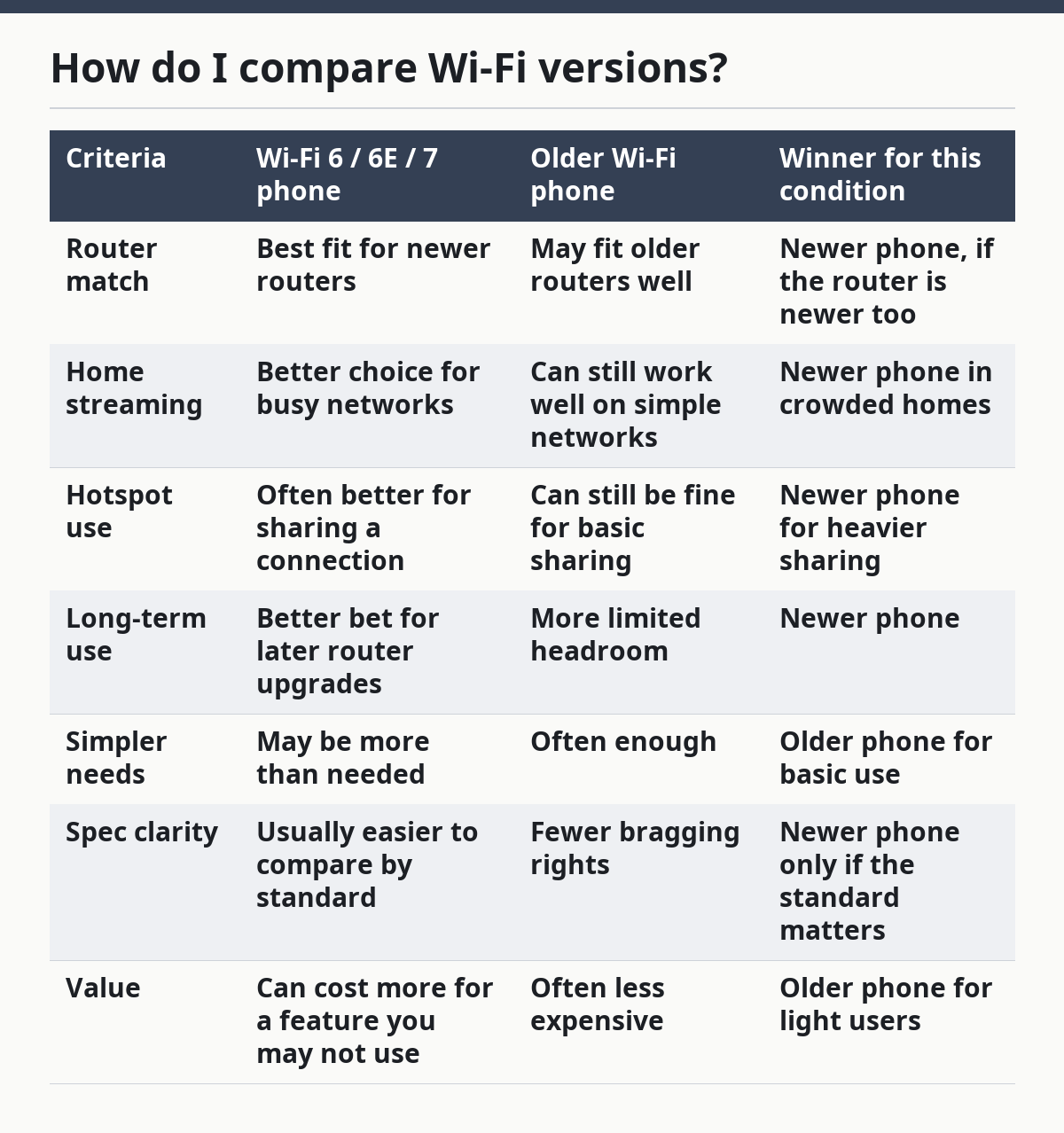
The honest drawback of chasing the newest Wi‑Fi standard is simple: the phone can look stronger on paper than it feels in the hand. If the router is not newer too, the extra cost can go nowhere useful. So the right question is not “What is the best Wi‑Fi version?” but “What Wi‑Fi version does this home network actually need?”
How do I compare Bluetooth versions?
Compare Bluetooth versions by checking whether the phone supports the accessories you already own or plan to buy. Bluetooth version matters most for wireless earbuds, speakers, watches, trackers, and car systems, but the profile and accessory support matter just as much as the version number.
Bluetooth 5.x is common in modern phones, but the version label alone does not guarantee every feature you want. A phone can list Bluetooth 5 and still be a poor fit if a specific headset or car kit needs a profile the phone does not support. That is why accessory compatibility belongs in the comparison, not just the version number.
This is the part many buyers miss. They compare phones as if Bluetooth were one simple feature. In real use, the phone has to work with the exact device you care about. Wireless earbuds may need stable audio support; a smartwatch may need a different set of functions; a car may expose its own compatibility limits.
The plain rule is this: Bluetooth version is the starting point, not the finish line. If you already own wireless earbuds, the best phone for you is the one that pairs cleanly with them and keeps the connection stable in the places you use them. If you are buying for future accessories, a newer Bluetooth version is usually the safer bet, but only if the rest of the phone also fits your budget and habits.
A good comparison question sounds like this: does the phone support the Bluetooth version and the accessory type I need, or just the version name? That question saves a lot of regret.
The downside of over-focusing on Bluetooth is that it can hide better day-to-day priorities. A phone with a slightly older Bluetooth number can still be the better buy if it fits the right earbuds, the right car, and the right price. A newer number without the right accessory support is just a badge.
Where do NFC and hotspot fit?
NFC and hotspot support belong in the same comparison because they change what the phone can do beyond basic Wi‑Fi and Bluetooth. NFC handles short-range tap actions, and hotspot support turns the phone into a connection share point for other devices.
NFC matters if the phone is meant for tap-to-pay, quick pairing, transit taps, or other short-range actions. A phone can have strong Wi‑Fi and strong Bluetooth and still miss the NFC feature that a buyer expects for payments. That is why NFC should be checked separately on the spec sheet instead of assumed.
Hotspot support is the other feature that often gets buried. A phone with strong Wi‑Fi and Bluetooth can still be a weak choice for sharing data if hotspot support is limited by the device, the carrier, or the plan. The buyer who travels, works away from home, or uses a tablet and laptop alongside the phone should pay close attention here.
The practical trade-off is battery life. Turning a phone into a hotspot can drain power faster than ordinary use, and that matters more than any spec badge. A phone that looks excellent on paper may still be a poor choice if hotspot use is part of the daily routine and battery life becomes a constant problem.
NFC also has a simple warning attached: not every market or model includes it. A buyer who needs tap-to-pay should confirm the feature on the exact model, not on a family name that sounds similar.
How do wireless audio and accessory support change the choice?
Wireless audio and accessory support often decide the better phone more than the wireless version number does. If the phone will live with wireless earbuds, a smartwatch, a car kit, and maybe a speaker, the accessory list matters as much as the connectivity labels.
Wireless earbuds are the clearest example. A phone can have a current Bluetooth version and still be a bad fit if the earbuds you own already rely on a specific pairing behavior or if the phone listing leaves out support details. The same is true for watches and car systems. The question is not only “Does it have Bluetooth?” but “Does it work with the devices I already use?”
This is where generic reviews often become weak. They praise a Bluetooth version, then ignore the actual devices that consumers own. That misses the point. A person does not buy Bluetooth in the abstract. A person buys it to use wireless earbuds on a commute, a speaker at home, or a car kit on the road.
Accessory support also affects frustration. If pairing fails, disconnects, or behaves oddly, the phone feels worse even if the spec sheet looked strong. That is why a comparison should include the exact accessory category and not stop at the version number.
The right choice here is usually the phone that is boringly compatible. That means the one that clearly lists the needed wireless audio support, NFC if payments matter, and hotspot support if sharing data matters. Flashy numbers help less than a clean match to the devices already in the drawer.
The honest side-by-side
Wi‑Fi wins for network use, Bluetooth wins for accessories, and neither replaces NFC. This side-by-side can help compare the features that affect everyday use.
| Criteria | Wi‑Fi | Bluetooth | Winner for this condition |
|---|---|---|---|
| Primary job | Internet access through a network | Nearby device connections | Wi‑Fi for web and streaming |
| Best match for | Routers, home networks, hotspots | Wireless earbuds, watches, speakers, cars | Depends on the device you use most |
| Version to check | Wi‑Fi 6, 6E, or 7 | Bluetooth 5.x and device profiles | No single winner |
| What can go wrong | New standard with an old router | New version without the right accessory support | Neither, if the setup is mismatched |
| NFC relation | Not related | Not related | NFC must be checked separately |
| Hotspot relation | Directly relevant | Not the main issue | Wi‑Fi for hotspot planning |
| Wireless audio | Not the main tool | Main tool for earbuds and speakers | Bluetooth for audio accessories |
| Buying signal | Look for router match and network needs | Look for accessory match and profile support | Depends on use case |
This table shows the core rule: compare the feature to the job. If the job is internet, focus on Wi‑Fi. If the job is accessories, focus on Bluetooth. If the job is payments, check NFC. If the job is sharing data, check hotspot support.
Which one should I choose?
Choose the phone with stronger Wi‑Fi if your main need is internet, hotspot use, or a future-ready router match. Choose the phone with stronger Bluetooth if your main need is wireless earbuds, watches, cars, or speakers. Neither is enough on its own if you also need NFC and the phone does not include it.
That is the cleanest verdict. A phone buyer who streams, downloads, and uses a hotspot should give Wi‑Fi the first vote. A phone buyer who spends the day on wireless audio or car connections should give Bluetooth the first vote. If both matter, pick the phone that clearly names the needed Wi‑Fi standard, a current Bluetooth version, and the accessory support you actually use.
This is not the place to chase the longest spec sheet. A newer label can hide a bad fit. A phone with Wi‑Fi 7 and Bluetooth 5.x is not automatically better than a phone with Wi‑Fi 6 and the exact accessory support you need. The right choice is the one that fits your router, your earbuds, and your payment habits without extra guesswork.
The mobile phone compatibility and network fit hub should sit around this decision, not the other way around. This feature check is one piece of the larger phone-buying puzzle, and it is the piece that shows up every day.
When should I look past the spec sheet?
Look past the spec sheet when the phone’s listed features do not match the exact devices and services you already use. A model can have Wi‑Fi, Bluetooth, NFC, and hotspot support on paper and still be wrong if the router, earbuds, watch, or payment setup does not fit.
One exception is a household that will upgrade the router soon. In that case, a newer Wi‑Fi standard can make sense even if today’s router is older, because the phone is being bought for the next setup, not the current one. Another exception is a buyer who never uses wireless audio; then Bluetooth version should not drive the decision much at all.
A third exception is payment-first use. If tap-to-pay is the main reason for checking wireless features, NFC is the deciding line item, not Wi‑Fi or Bluetooth. A fourth exception is heavy hotspot use on the road. In that case, hotspot support and battery behavior matter more than a small step up in either wireless version.
The warning is simple: do not pay for a spec you cannot use. That applies to Wi‑Fi 7 on an old network, Bluetooth upgrades with no matching accessories, and NFC that is missing from the exact model. The best phone is the one whose wireless features line up with the next 12 months of real use.
FAQs
What matters most when comparing Wi‑Fi and Bluetooth on a phone?
Wi‑Fi matters most for internet use, and Bluetooth matters most for accessories. That split is the clearest way to compare phones without getting lost in version numbers.
Do I need the newest Wi‑Fi version?
Not always. A newer Wi‑Fi version helps most when your router is also newer or when you expect to upgrade the network soon. If your use is basic browsing and messaging, an older standard can still be enough.
Does a better Bluetooth version mean better earbuds?
Not by itself. Bluetooth version helps, but the phone also has to support the right accessory type and profiles. A good match with your earbuds matters more than the badge alone.
Is NFC part of Wi‑Fi or Bluetooth?
No. NFC is separate from both, and it needs its own check on the spec sheet. If you want tap-to-pay or similar short-range actions, confirm NFC on the exact model.
Drafted with AI; not yet reviewed by a person.