
How to Spot Mobile Phone Listings That Are Preorder Only
Last updated: November 19, 2026
Key Takeaways
- A preorder-only listing means the phone is not yet ready to ship.
- Shipping wording matters more than the headline when you check the listing.
- In this article, the mobile phone preorder listing check uses five cues: title, shipping line, release date, deposit rule, and checkout notes.
- A deposit often signals reservation before shipment, not existing stock.
A Quick Answer: a mobile phone listing is preorder only when the page says the phone is not ready to ship yet and gives a future release date, shipping estimate, or deposit rule. This guide on How to Spot Mobile Phone Listings That Are Preorder Only focuses on those page cues, not marketing language. If it won’t ship now, it’s a preorder listing. The steps below show the wording and page cues that separate preorder pages from ready-to-buy listings.
What a preorder-only phone listing looks like
A preorder-only listing tells you the phone is still in the queue, not on the shelf. You’ll usually see release date, shipping estimate, or preorder in the first screen of the page, often beside an “Order now” or “Reserve yours” button. If the page mentions a future ship date instead of “ships today,” treat it as preorder only; if you are unsure, consult the seller’s terms or a consumer-protection source before paying.
Picture this: you’re on a phone product page, and the price is there, the color choices are there, but the delivery line says the device will ship later. That page is not a same-day stock listing. It’s a preorder page, even if the site makes it look like a normal product listing.
The simplest clue is the timing language. A ready-to-ship listing talks about in stock, ships in 24 hours, or an actual delivery window tied to current inventory. A preorder-only page talks about launch timing instead. That may be a date, a week, or a month.
Look for these exact cues:
- “Preorder now”
- “Available for preorder”
- “Ships on [future date]”
- “Estimated shipping starts [future date]”
- “Reserve your phone”
- “Release date: [future date]”
If the page uses one of those phrases, you’re not looking at a live stock listing.
How do I tell preorder wording from normal stock wording?
You tell preorder wording from stock wording by reading the shipping line, not the headline. A page can say “buy now” and still be preorder only if the delivery section shows a later ship date, a launch date, or a waitlist-style estimate.
Picture this: the product banner looks ready, but the checkout section changes the story. That’s where the truth sits. The page may promise the phone, but not the handoff.
Here’s a quick comparison of the wording that matters:
| Wording on the page | What it usually means |
|---|---|
| Ships today | Ready to ship |
| In stock | Ready to ship |
| Ships in 1–2 business days | Usually available now, with a short handling delay |
| Preorder now | Not ready yet |
| Ships on launch day | Preorder only |
| Estimated shipping starts later | Preorder only |
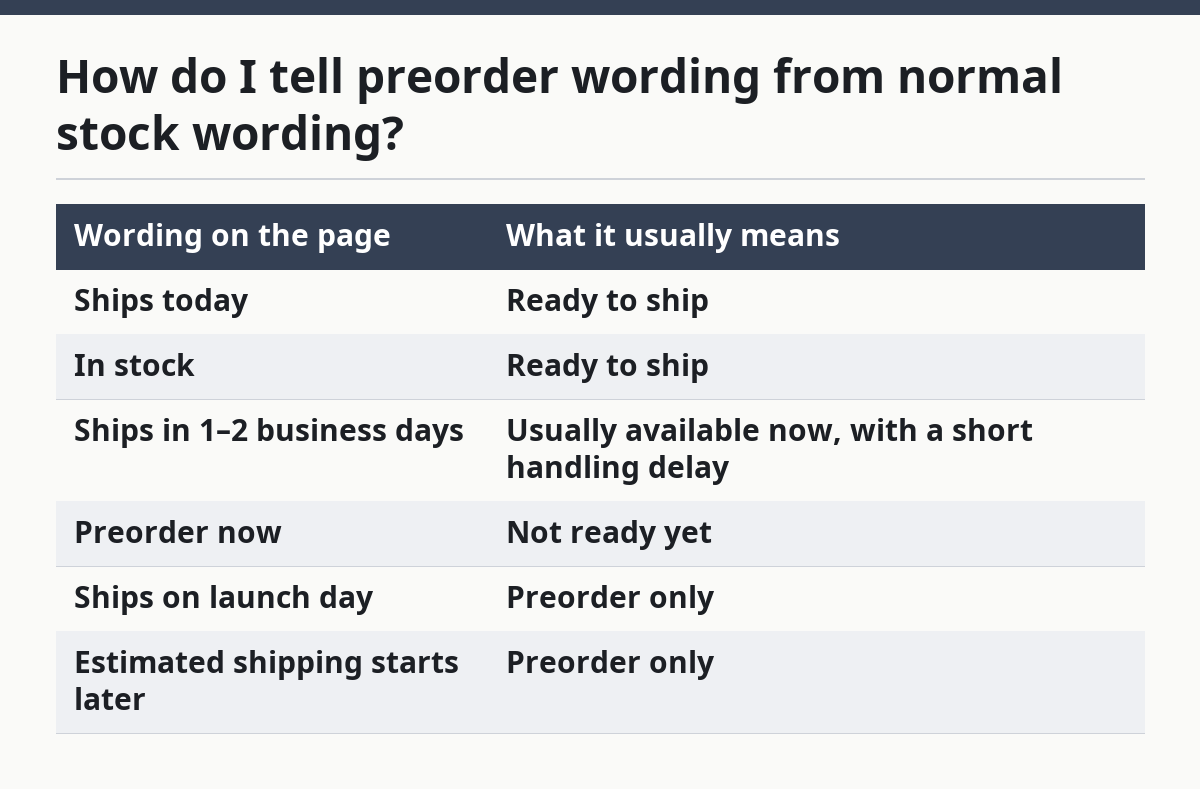
The best clue is whether the page gives you a future date before the phone is in your hands. If it does, the listing is about reservation, not immediate stock. A normal stock page can still show a delivery window, but it won’t frame the phone as awaiting release.
Another clue is language on the checkout button. “Preorder,” “Reserve,” and “Join the waiting list” are not the same as “Add to cart.” They point to different stages of availability. The button alone is not proof, though. Some stores use the same checkout flow for both ready stock and preorder items, so check the shipping line too.
The fastest way to check a mobile phone preorder listing
The fastest way to check a mobile phone preorder listing is to read the product page in this order: title, shipping line, release date, deposit rule, and checkout notes. That takes less than a minute and catches most preorder-only pages before you pay.
Picture this: you’re comparing two phone listings and want the answer fast. One says “preorder” in the header, the other hides it in the fine print. A short scan usually tells you which is which.
Use this simple order every time:
-
Read the product title and banner.
If the title says “preorder” or “coming soon,” the page is already telling you the phone is not live stock. -
Find the shipping line.
Look for “ships on,” “shipping begins,” or “estimated shipping.” A future date means the listing is preorder only. -
Check the release date wording.
If the phone has a launch date listed and the page says orders are tied to that date, it’s not an immediate-ship sale. -
Look for a deposit.
Some preorder pages ask for a deposit or partial payment. That usually means the seller is holding your place before stock arrives. -
Open the checkout summary.
The final page often repeats the truth in plain language: preorder status, ship date, or backorder-style terms.
The point is to stop treating the page like a normal product listing, and consumer agencies such as the FTC advise reading the full offer details before purchase. A preorder page often uses the same photos, specs, and price box as a live listing. The only reliable difference is timing language.
What deposit requirements tell you
A deposit requirement usually means the phone is being reserved before shipment, not sold from existing stock. If the page asks for a partial payment, reservation fee, or preauthorization tied to a future date, you’re looking at a preorder-only setup.
Picture this: the site lets you click through to checkout, but the order summary says a deposit is due now and the rest later. That is not a ready-to-ship sale. It’s a hold on a future phone.
Deposit language can take a few forms:
- “Pay $X to reserve”
- “Deposit required”
- “Partial payment today”
- “Balance due before shipping”
- “Preorder fee”
A deposit does not automatically mean anything is wrong. It means the seller is separating the reservation from the shipment. That matters because a reader can mistake a deposit page for immediate availability and miss the fact that the phone will not ship until a later launch window.
Watch the wording around refunds too. Preorder pages often explain whether the deposit is refundable, non-refundable, or credited toward the final price. If that language is missing, the page is not being clear enough for a fast purchase. A seller that wants a preorder should say so plainly.
This is where people get tripped up: the presence of a price can make a page feel ready. It isn’t. A quoted price only tells you the cost, not the timing. The shipping date tells you whether the phone exists for sale right now or only as a future allocation. For more on timing language, see the mobile phone launch availability and timing hub.
Why launch-day listings can still be preorder only
Launch-day listings can still be preorder only when the seller uses the release date as the ship date, not the delivery date. The page may appear on launch day, but if the shipping estimate still says the phone ships later, it is not ready stock.
Picture this: a new phone has “today’s launch” all over the page, but the delivery estimate says “ships in 2 weeks.” That’s a preorder page wearing a launch-day label.
This happens with high-demand phones, color variants, and storage sizes, including cases where one color or capacity sells out before another. The store may accept orders before all units are physically available. The page may look polished and current, but the order status still depends on future inventory.
The tell is the difference between release date and shipping status:
- A release date tells you when the phone is announced or begins sale.
- A shipping status tells you when the phone leaves the warehouse.
- A preorder-only listing often has the first without the second.
If the page says “available on release day” but the fine print says “orders ship beginning [later date],” trust the fine print. That line determines whether you’re buying a phone that will arrive now or later.
A lot of generic advice says to “watch for launch language,” but that’s too loose. Launch-day language can describe a preorder just as easily as a live listing. The page has to give you actual fulfillment timing, not just a marketing label.
Common mistakes that make people miss a preorder page
The most common mistake is reading the headline and skipping the shipping section. That costs you time, and sometimes money, because the page may look ready even when the phone is weeks away from shipping.
Picture this: you spot a familiar phone name, see the add-to-cart button, and assume it’s in stock. Then the confirmation email says preorder. The page told you the truth; it just didn’t put it where you were looking.
Watch out for these mistakes:
-
Mistake: trusting the hero banner.
Cost: the banner can say “new arrival” or “now available” while the checkout page still shows preorder terms.
Do this instead: read the shipping line before you click buy. -
Mistake: ignoring small text under the price.
Cost: the key date is often tucked beside the price or the button.
Do this instead: scan for “ships,” “est.”, “release,” and “deposit.” -
Mistake: assuming all variants share the same status.
Cost: one storage size may be preorder only while another is in stock.
Do this instead: check the exact color and memory option you want. -
Mistake: treating “reserve now” like “buy now.”
Cost: a reservation can mean future fulfillment, not immediate shipment.
Do this instead: look for the expected ship date before checkout. -
Mistake: skipping the cart page.
Cost: the cart often repeats preorder terms more clearly than the product page.
Do this instead: confirm the delivery note before you submit payment.
A clear page should make timing obvious. If you have to hunt for the ship date, the listing is already giving you a signal: this is not a normal in-stock sale.
What the page should say if it is preorder only
A preorder-only page should say it directly, in plain words, and not hide the timing behind sales copy. You want one of three things to be obvious: preorder status, release date, or shipping estimate.
Picture this: you’re on the final checkout screen, and the phone still hasn’t told you when it ships. That’s a problem. A preorder page should not make you guess.
Here are the clearest phrases:
- “Preorder only”
- “Available for preorder”
- “Ships after launch”
- “Estimated shipping begins [date]”
- “Release date: [date]”
- “Deposit required to reserve”
The page should also avoid mixed signals. If it says “buy now” but the order summary says “preorder,” the summary wins. If it says “in stock” but the shipping estimate is in the future, the shipping estimate wins. The checkout terms are the legal and practical version of the page.
If you’re still unsure, look for consistency across the page:
- Product title
- Price box
- Shipping note
- Cart summary
- Order confirmation text
When all five say the same thing, you can trust the listing status. When they don’t, treat the page as preorder only until proven otherwise.
For a broader look at timing cues across phone launches, see the mobile phone launch availability and timing hub. That page covers the bigger release pattern; this one is about spotting the preorder label on the listing itself.
FAQ
What does preorder only mean?
Preorder only means the phone can be ordered before it is ready to ship. The listing usually shows a future release date, shipping estimate, or deposit requirement. It is a reservation for later fulfillment, not proof that the device is already in stock. For a consumer-facing explanation of preorder and shipping terms, see the FTC and your local consumer-protection guidance.
Can I cancel a phone preorder?
You often can, but the rule depends on the seller’s policy. Some preorder pages allow cancellations before shipment, while others tie refunds to a deposit rule or a short window before dispatch. Read the order terms and the checkout summary before you pay, and check the seller policy if you need an exact answer.
Does preorder mean the phone is not released yet?
Usually, yes. Preorder means the phone is being sold ahead of delivery, so release and shipping may still be ahead of you. Some stores accept preorders on launch day, but the phone can still be preorder only if the shipping date is later.
Why does a listing say “buy now” if it is preorder only?
Because the button can be marketing language, not inventory status. A page may let you place an order today while still labeling the product as preorder in the shipping section or order summary. The shipping line tells you more than the button does.
Drafted with AI; not yet reviewed by a person.