
Mobile Phone Specs and Variant Selection: The Complete Guide
Last updated: November 19, 2026
Quick Answer: choose the variant that clears your carrier bands, gives you at least 256GB if you store lots of photos or video, and matches your charging standard before you pay extra for camera or screen upgrades. You’re trying to pick a phone and the spec sheet looks like a wall of numbers. Choose the model variant that matches your carrier bands, storage needs, and charging standard first; camera and screen upgrades matter only after that. The sections below sort out which specs actually change daily use, and which ones are just marketing gloss. This guide to Mobile Phone Specs and Variant Selection: The Complete Guide keeps the focus on the details that shape day-to-day use.
Key takeaways
- Storage, network bands, and charging are the first three specs to check before anything else.
- A bigger RAM number is not always the right upgrade; chipset, software support, and storage speed can matter more.
- Variant names like “Pro,” “Ultra,” and “Plus” often hide bigger differences than the headline camera count.
- The wrong region variant can mean missing 5G bands, eSIM limits, or no local warranty.
- A phone that looks cheaper on paper can cost more if it forces you into slower storage or too little RAM.
What do phone specs actually tell you?
Phone specs tell you how a phone will fit your network, your apps, your photos, and your budget. They also tell you what the maker chose to leave out — and that is often where the bad surprises live.
Picture this: you’ve narrowed it to two phones that look nearly identical online, but one has 128GB storage, UFS 2.2, and a weaker main camera, while the other has 256GB, UFS 3.1, and better long-term support. The second one is usually the smarter buy. Specs only help when you read them as trade-offs, not as trophies.
Here’s the catch:
- A spec sheet can hide regional differences.
- A model name can cover several different chipsets.
- A camera count can distract from sensor size, stabilization, and software processing.
A good first pass is simple:
- Check the exact model number, not just the retail name.
- Confirm network support for your country and carrier.
- Look at storage, RAM, and expansion options.
- Compare the chipset, display type, battery size, and charging rate.
- Read the fine print on eSIM, dual SIM, warranty, and included accessories.
For a standards-based check, look at the GSMA’s work on device and network compatibility, and at the USB-IF pages on USB Power Delivery if charging speed matters to you. Those organizations publish the language that phone makers often simplify into marketing copy. For network planning, the GSMA’s spectrum and compatibility resources are a useful reference, and the USB-IF’s USB Power Delivery pages explain why charging labels can vary across devices.
Which specs matter first when buying a phone?
Storage, network support, and the chipset matter first because they affect whether the phone works the way you need it to work. Camera counts, refresh rate, and “AI features” come later.
Picture this: you’re comparing a phone with 8GB RAM and 128GB storage against one with 12GB RAM and 256GB storage. If you keep lots of photos, shoot video, or install heavy apps, the storage jump is usually more useful than the extra RAM. The better variant is the one that removes daily friction.
Use this order:
- Network bands and SIM support: If your carrier uses a band the phone lacks, no screen size can save the purchase.
- Storage: 128GB is enough for some people, but it fills fast with video, offline media, and large games.
- Chipset: A better processor often means smoother app switching, better image processing, and longer useful life.
- RAM: Helpful for multitasking, but less important than a capable chip and enough storage.
- Battery and charging: Battery size matters, but charging standard and adapter support matter too.
- Display: OLED vs LCD, brightness, and refresh rate affect comfort more than raw pixel count for most people.
The truth is, most buyers overweight the camera. That makes sense; the camera is easy to market. Yet the difference between 50MP and 200MP matters less than sensor size, lens quality, stabilization, and post-processing. A 12MP camera with a strong sensor can beat a higher-numbered one in dim light. The same logic applies to the rest of the phone specs: the number on the box is only useful when you know what it changes in practice.
How do I choose the right storage and RAM variant?
Pick the variant that leaves headroom for your real use, not the one that sounds future-proof. For many people, storage is the first hard limit, and RAM is the second. That is why Mobile Phone Specs and Variant Selection works best when you start with usage instead of the marketing tier.
Picture this: you buy a 128GB phone, then spend months deleting videos, clearing downloads, and watching app updates creep up. The phone still works, but it feels cramped. That’s a storage problem, not a speed problem.
A simple rule set helps:
- Choose 128GB only if you stream most media, use cloud storage, and rarely shoot 4K video.
- Choose 256GB if you keep a lot of photos, offline playlists, games, or travel downloads.
- Choose 512GB if you shoot a lot of video or want the phone for several years without managing space.
- Choose 8GB RAM for normal use on most modern phones.
- Choose 12GB RAM if you keep many apps open, play heavy games, or want more breathing room for years.
But RAM alone can mislead. A phone with fast storage and a tuned chipset may feel snappier than a phone with more RAM and slower internal storage. UFS storage standards matter here; older eMMC storage feels sluggish in everyday use because app launches and file handling slow down. In other words, the right phone specs are about the full chain, not one headline number.
What a generic article leaves out is the hidden cost of “base model” pricing. The entry variant often uses the same shell and the same marketing photos, but trims storage, RAM, or the camera sensor. That can make the phone seem like a bargain while quietly making it the wrong long-term pick.
What’s the real difference between standard, Plus, Pro, and Ultra variants?
The real difference is usually not just size — it’s the mix of display, cameras, battery, chipset, and build material. A “Pro” phone often earns the name through more than one upgrade, while a “Plus” model may simply be the same phone with a bigger battery and screen.
Picture this: you are looking at a standard model and a Pro variant with the same brand badge, but the Pro has a brighter display, a telephoto lens, a faster chipset, and a larger battery. That is a real upgrade path. A bigger name only matters if the hardware changes with it.
Typical patterns often look like this:
- Standard: best value, fewer premium features, often the safest starter choice.
- Plus: larger screen and battery, sometimes not much else.
- Pro: better display, camera, chip, or materials.
- Ultra: top-end cameras, best screen, highest storage options, sometimes stylus support.
That said, naming is messy. One brand’s “Pro” may be another brand’s mid-tier phone. Some makers use the same name across different regions with different chipsets. That is why the model number matters more than the marketing label. When you compare Mobile Phone Specs and Variant Selection across brands, the suffix often matters more than the slogan.
A smart buyer checks:
- Whether the chipset is the same across variants.
- Whether the display uses the same panel type and brightness.
- Whether the camera hardware changes or only the software does.
- Whether battery capacity and charging speed are identical.
- Whether the build uses aluminum, stainless steel, or plastic.
If you want the simplest decision rule, it often helps to choose the cheaper variant if the only differences are color and storage you will not use. Choose the higher variant if it adds a telephoto camera, a much better chipset, or a bigger battery that matches your day.
What should I check in a phone spec sheet before buying?
Check the spec sheet in the same order you’d check a used car: compatibility first, then condition, then extras. A beautiful phone with the wrong band support is a bad buy.
Picture this: you open a listing and see 120Hz, 108MP, and 67W charging, but no mention of band support, storage type, or software update policy. That is a warning sign, not a selling point. Missing details often matter more than flashy numbers.
Use this checklist:
- Model number: Confirms the exact variant.
- Bands and SIM: Look for local 4G/5G support, dual SIM, and eSIM if you need it.
- Storage type: UFS is better than older budget storage standards.
- Display: OLED or LCD, refresh rate, brightness, and resolution.
- Processor: A named chip matters because it tells you more than the marketing tier.
- Battery and charging: Battery size, wired charging wattage, wireless charging, reverse charging.
- Ports: USB-C version, headphone jack, microSD slot, or lack of them.
- Software support: Years of OS and security updates, if the maker states them clearly.
- Durability: IP rating, glass type, and frame material.
- Camera hardware: Main sensor, ultrawide, telephoto, optical stabilization, front camera.
One common mistake is to compare only headline numbers. A 200MP camera does not automatically beat a 50MP camera. A 144Hz screen does not matter if brightness is poor outdoors. A 100W charger does not matter if the phone runs hot and throttles. The best spec sheet is balanced, not loud. For buyers sorting through phone specs, the most useful figures are the ones tied to real use.
How do I choose the right region or carrier variant?
Choose the variant sold for your market unless you have a clear reason not to. Region mismatches can break 5G access, eSIM support, warranty service, or even payment features.
Picture this: you import a phone that looks identical to the local version, but your carrier’s best 5G band is missing. The phone still turns on, but it never performs like it should. That is a compatibility failure, not a minor compromise.
The main regional issues are:
- Band support: Different countries use different 4G and 5G frequencies.
- eSIM: Some variants support it; others do not.
- Dual SIM behavior: Some phones use two physical SIMs, some use one physical SIM plus eSIM.
- Charging plug and adapter: The box contents can differ by market.
- Warranty: International warranty is not guaranteed.
- Software features: Camera shutter rules, call recording, or payment tools can vary.
Carrier variants can be even trickier. Some include carrier apps you cannot remove, bootloader restrictions, or delayed software updates. If you plan to keep a phone for years, a cleaner opened version is often the better choice.
The model number usually exposes the difference if you know where to look, and that matters when you compare phone specs across stores. Compare the exact suffix on the box, in the settings menu, or on the retail listing. If the seller won’t show it, that is a red flag.
Which specs matter most for camera, screen, and battery buyers?
Camera buyers should care more about sensor size, stabilization, and lens count than megapixels alone. Screen buyers should care more about panel quality and brightness than raw resolution. Battery buyers should care about charging behavior, not just capacity.
Picture this: you want a phone for photos, reading, and long days away from a charger. A phone with a strong main camera, an OLED screen, and a sensible battery setup may beat a flashier spec sheet with more lens labels. Real-world use beats headline numbers.
Camera specs worth reading:
- Main sensor size: Larger sensors usually help with light capture.
- Optical image stabilization: Helps reduce blur in low light and video.
- Telephoto lens: Better for portraits and zoom than digital crop.
- Ultrawide lens: Useful for travel and groups, but often weaker in low light.
- Video support: Look for stabilization, 4K support, and frame rates.
Screen specs worth reading:
- OLED vs LCD: OLED usually gives deeper blacks and better contrast.
- Refresh rate: 90Hz or 120Hz can feel smoother, but the rest of the phone must keep up.
- Brightness: Outdoor use depends on this more than on resolution.
- PWM dimming: Some eye-sensitive readers care about this, though makers don’t always disclose it clearly.
Battery specs worth reading:
- Capacity: Measured in mAh, but not the whole story.
- Charging speed: Faster is nice, but thermal control matters.
- Wireless charging: Handy if you use pads or car mounts.
- Reverse charging: Useful for earbuds and accessories.
A generic guide often says “bigger is better.” That breaks down fast. A 5,000mAh battery with efficient hardware can outlast a larger cell in a power-hungry phone. A 60Hz OLED can still be a better screen for some people than a dim 120Hz panel. The spec list only matters if you know what each line changes in daily use. To compare Mobile Phone Specs and Variant Selection fairly, put the battery, camera, and display into the context of your routine.
The honest side-by-side: how to compare two phone variants
The winning variant is the one that fixes your real bottleneck at the lowest total compromise. If you compare phones this way, you’ll stop getting distracted by spec-sheet noise.
Picture this: you’ve got two variants of the same phone in front of you, and both look close enough to confuse a casual shopper. One has better storage and band support; the other has a better camera and more RAM. The winner depends on where you feel pain every day. Pick the bottleneck, not the bragging rights.
| Criteria | Variant A | Variant B | Winner for [condition] |
|---|---|---|---|
| Storage | 128GB | 256GB | Variant B for photo, video, or game-heavy users |
| RAM | 8GB | 12GB | Variant B for heavy multitasking |
| Chipset | Mid-tier | Higher-tier | Variant B for long-term speed |
| Main camera | Standard sensor | Larger sensor | Variant B for low light |
| Display | OLED 60Hz | OLED 120Hz | Variant B for smoother scrolling |
| Battery | Same capacity | Same capacity | Tie if only capacity is equal |
| Charging | 25W wired | 45W wired | Variant B for fast top-ups |
| Bands | Fewer supported bands | More local bands | Variant B for travel or carrier certainty |
| Weight | Lighter | Heavier | Variant A for pocket comfort |
| Warranty | Import-only | Local support | Variant B for peace of mind |
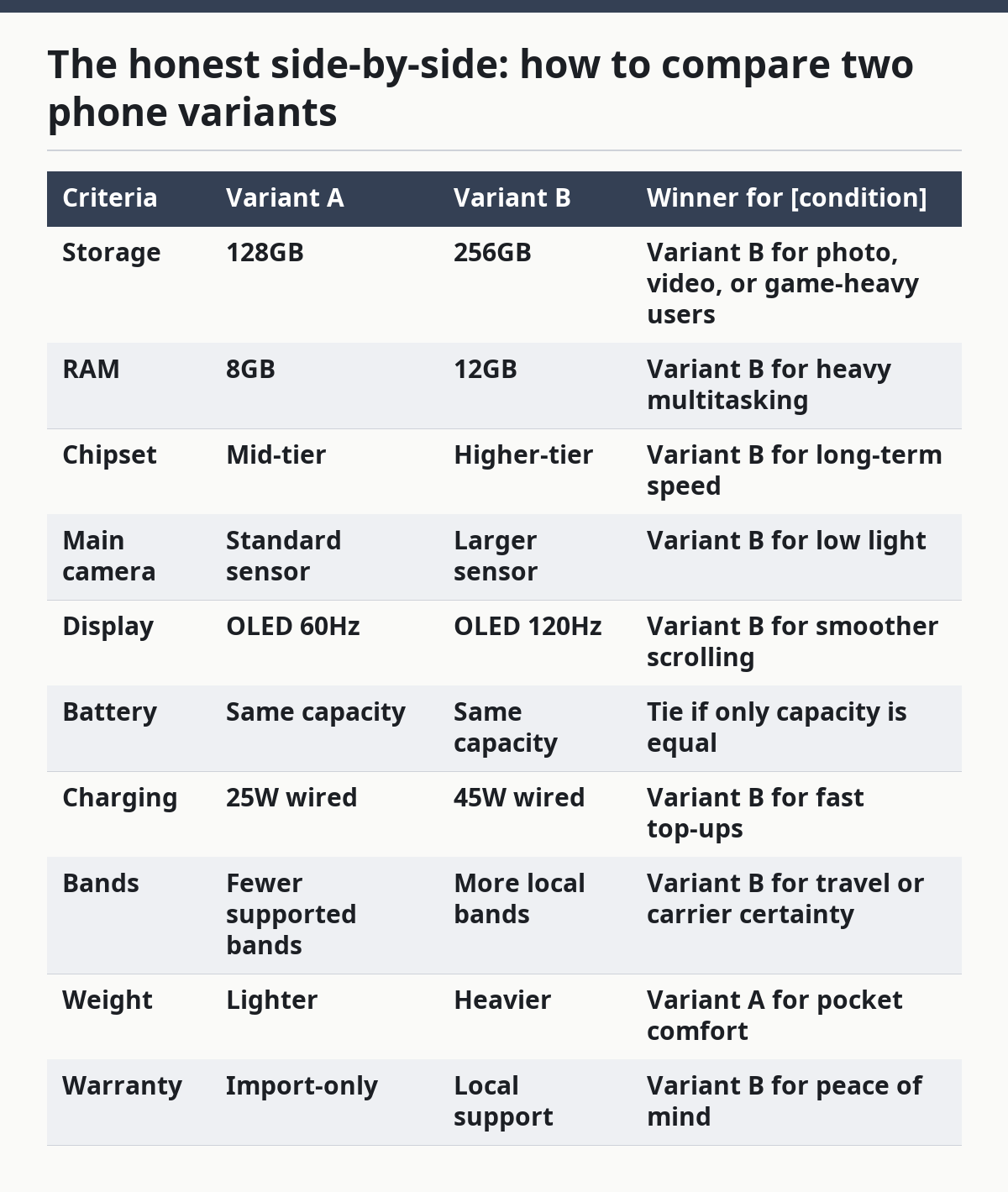
Here’s the simple rule: if the cheaper variant saves money but drops you below 256GB, below 8GB RAM, or outside your carrier band set, it can become the false economy. On the other hand, if the only upgrade is a fancier camera label and a color you like more, keep the lower tier. That is the cleanest way to compare phone specs without getting pulled into branding.
When should you skip the higher spec model?
Skip the higher spec model when the upgrade does not change your bottleneck or when it adds problems you will actually notice. Paying for the top variant only makes sense if the added hardware changes your day.
Picture this: you’re tempted by the “Ultra” label, but you mostly message, stream, and browse. A huge camera bump or a massive display may only give you a heavier phone and a shorter battery cycle in your hand. More spec is not always more value.
Skip the upgrade if:
- You already have enough storage for the next two to three years.
- The higher model uses a worse in-hand shape or heavier frame.
- The camera upgrade is minor and you never zoom.
- The local market version of the expensive model lacks the same band support.
- The premium is mostly for materials, not function.
There is a flip side too. Some upgrades are worth it because they preserve resale value, bring stronger update support, or avoid storage anxiety. That is why the right question is not “which is best?” but “which one fixes my problem without creating a new one?”
A good rule: if the variant difference cannot be felt in your daily use within 30 days, it probably should not drive the purchase. The right Mobile Phone Specs and Variant Selection decision usually shows up in convenience, not status.
What are the exception cases where the usual advice flips?
The usual advice flips when your use case is unusual, your carrier is picky, or your storage habits are extreme. Those cases are not rare enough to ignore.
Picture this: you travel often, you record a lot of video, or you keep your phone for four to five years. Then the standard “just buy the base model” answer stops working. Edge cases deserve different rules.
The main exceptions:
- You shoot lots of 4K video — choose more storage sooner, because video fills space fast.
- Your carrier depends on specific bands — choose the region variant that matches those bands, even if it costs more.
- You keep phones for years — choose the stronger chipset and higher storage tier for longer useful life.
- You rely on eSIM or dual SIM — verify support before anything else, because not every variant includes both.
One more exception matters: if you buy used or refurbished, storage and battery health can outweigh model tier. A higher-spec phone with a worn battery can be worse than a lower-spec phone in better condition. That is one reason the spec sheet alone is never the whole story.
The truth is, the “best” variant changes once your real constraint becomes clear. If your phone is a work tool, network support and storage come first. If it is a camera, lens and sensor quality rise. If it is a travel device, band support and battery behavior become the main event.
The Verdict: which variant should you choose?
Choose the base or mid variant if you stream most media, use cloud storage, and want the lowest risk of paying for features you won’t use. Choose the higher storage or Pro variant if you keep lots of photos and video, want the better chip, or plan to keep the phone for years. Neither if the model number doesn’t match your carrier bands, eSIM needs, or warranty region.
That is the cleanest answer. If you need a plain rule, buy the variant that clears your network checks, gives you at least enough storage for your next upgrade cycle, and only then improves the screen or camera. A flashy spec sheet that misses those three is the wrong phone.
FAQs
How much RAM do I really need in a phone?
8GB is enough for many buyers, while 12GB suits heavier multitasking and longer ownership. The bigger number is not magic on its own; chipset quality and storage speed also shape how smooth the phone feels. If you keep many apps open or play demanding games, 12GB gives more margin.
Is 128GB storage enough?
128GB is enough only if you stream a lot, use cloud storage, and don’t keep many large files offline. Photos, 4K video, downloads, and games can fill it fast. If you want less storage management, 256GB is the safer choice for most people.
Should I buy a region import to save money?
Only if the exact model matches your carrier bands, SIM setup, and warranty needs. Imports can work well, but the wrong variant can block 5G bands or leave you without local service support. Check the model number before you buy.
Do megapixels tell me if a camera is good?
No, megapixels alone do not tell you that. Sensor size, stabilization, lens quality, and software processing matter just as much, and often more. A lower-megapixel camera can still produce better photos in low light.
Is a 120Hz screen always better than 60Hz?
Not always. A 120Hz screen can feel smoother, but brightness, panel quality, and battery drain matter too. If you read a lot outdoors or care more about battery life, a good 60Hz OLED can still be the better buy.
Drafted with AI; not yet reviewed by a person.