
How to Check if a Mobile Phone Includes Accidental Damage Cover
Last updated: November 19, 2026
Check the policy wording, the listing text, and the checkout add-on before you buy or claim. If those three places do not clearly mention accidental damage cover, screen repair, or water damage, assume the phone only has a basic warranty and not accident protection.
Key takeaways
- Look for the exact words accidental damage cover in the listing, warranty terms, or policy document.
- A normal warranty often covers faults, not a dropped phone, cracked screen, or liquid damage.
- The quickest proof is the policy summary or checkout page, because that is where add-ons are usually named.
- Keep the receipt, serial number, and proof of purchase; claims often need them.
- If the wording is vague, ask for the exclusions list before you rely on the cover.
What does accidental damage cover actually mean?
Accidental damage cover means the phone is protected when it is broken by an unplanned event, not by a fault in the device. That usually includes a dropped phone, a cracked screen from impact, or water damage from a spill or splash, but the exact wording matters.
A generic warranty terms page may cover defects in materials or workmanship and leave out accidental damage entirely. That matters because a screen repair for a cracked display can be expensive, while a manufacturing fault is a different kind of claim. The label on the box or listing is not enough on its own; the policy wording has to say what it pays for.
Two common phrases matter here: accidental damage cover and insurance policy. If the document uses insurance language, it may include a claim process, excess, exclusions, and limits. If it only says “warranty,” it may not cover a drop at all.
For this topic, the useful question is not “Does the phone have a warranty?” It is “Does the warranty terms page or add-on mention accidental damage, screen repair, or water damage?” Those are the words that usually separate repair after a fault from repair after an accident.
Where should I check first?
Check the product listing first, then the warranty terms, then the checkout add-ons. Those three places usually show whether accidental damage cover is included, sold separately, or excluded.
If the phone is sold with a package, scan the short benefits list for phrases like “accidental damage,” “damage cover,” “screen repair,” or “water damage.” A 12-month warranty by itself is not enough to prove accident cover. The number matters less than the wording next to it.
If you are buying online, the checkout page is often the clearest place to spot an add-on. A separate checkbox or fee for protection usually means the base phone price does not include it. If the add-on is selected by default, read the summary line before paying.
If you are checking after purchase, open the confirmation email and the PDF policy. Those documents often name the exact cover more clearly than the product page. Keep the receipt too, because many policies tie the cover to proof of purchase and the phone’s IMEI or serial number.
How do I check a phone step by step?
Check a phone’s accidental damage cover by reading the document that names the protection, then matching it to the device and the date of purchase. Use the listing, receipt, warranty terms, and policy page in that order.
- Open the listing and look for the exact phrase “accidental damage cover” in the benefits section. If it appears, note whether it mentions a screen crack, liquid damage, or theft separately.
- Read the warranty terms and find the section headed exclusions or what is not covered. If accidental damage is excluded, the phone does not have that cover under the basic warranty.
- Check the checkout page for an optional protection add-on. If there is a separate line item for cover, the base product may not include it.
- Review the policy document or confirmation email and search for “accident,” “damage,” “screen repair,” and “water damage.” Those words usually show the real scope of cover.
- Match the device details against the receipt, IMEI, or serial number. If the policy names a different model or purchase date, the cover may not apply.
- Save proof of purchase in one place. A claim often needs the receipt, order number, and policy number before any repair is approved.
A small detail can change the answer. For example, a policy may cover one accidental screen repair but exclude repeat claims, or it may cover water damage but not liquid ingress from a full submersion. The coverage name is not enough; the exclusions tell you what the policy will refuse.
Which words prove the cover is there?
The clearest proof is a sentence that names accidental damage and says what it includes. A simple warranty line that only says “hardware defects” does not prove cover for drops, spills, or a cracked screen.
Look for wording such as:
- accidental damage cover
- accidental damage protection
- screen repair
- water damage
- damage caused by drops or spills
- insurance policy
Those phrases are useful because they point to the event and the repair type. A standard warranty may talk about faults, defects, or workmanship instead. That wording usually means the phone is covered if it fails on its own, not if it slips from a table onto the floor.
Also check for policy limits. A claim limit may be written as one repair, one replacement, or a set number of claims during the policy period. The exact number changes from plan to plan, so the important part is not the figure itself; it is whether the policy caps the cover at all.
If the listing says “includes protection” but does not say what kind, that is not enough. Ask for the policy document or the schedule. That is where the real promise sits.
What exclusions should I look for?
Check exclusions before you assume accidental damage cover is broad. A policy can mention accidents and still refuse certain kinds of damage or certain repair requests.
The usual exclusions include pre-existing damage, cosmetic marks, loss, and damage that happened before the cover started. Some policies also exclude repairs done by an unapproved shop, use of non-genuine parts, or damage caused by repeated abuse rather than a single accident. If a phone already has a cracked screen, a new claim may fail even if the policy includes screen repair.
Proof matters here. Without proof of purchase, a claim can stall because the insurer or retailer cannot confirm the policy start date. Without the IMEI or serial number, they may not link the policy to the right device. That is why the receipt is not just a spare document; it is part of the cover.
A good habit is to read the exclusions section before you rely on the policy. If the section is long, the shortest useful question is: “What would make a claim fail?” If the answer includes accidental drops, liquid damage, or screen cracks, then the cover is narrower than it looked.
This is also where a reader can go wrong by assuming “repair warranty” means the same thing as accident protection. It does not. Repair after a fault and repair after a spill are different promises.
What is the fastest way to confirm cover before checkout?
The fastest way is to open the checkout summary and look for a separate protection line, then read the policy summary next to it. If the page names accidental damage cover, you usually have the answer in under a minute.
A quick comparison helps:
| Where you check | What to look for | What it usually tells you |
|---|---|---|
| Product listing | “Accidental damage cover,” “screen repair,” “water damage” | Whether cover is marketed with the phone |
| Warranty terms | “Exclusions,” “what is not covered” | Whether accidents are left out |
| Checkout page | Optional add-on, protection plan, insurance policy | Whether cover costs extra or is selected separately |
| Confirmation email | Policy number, device model, start date | Whether the cover was actually attached to your order |
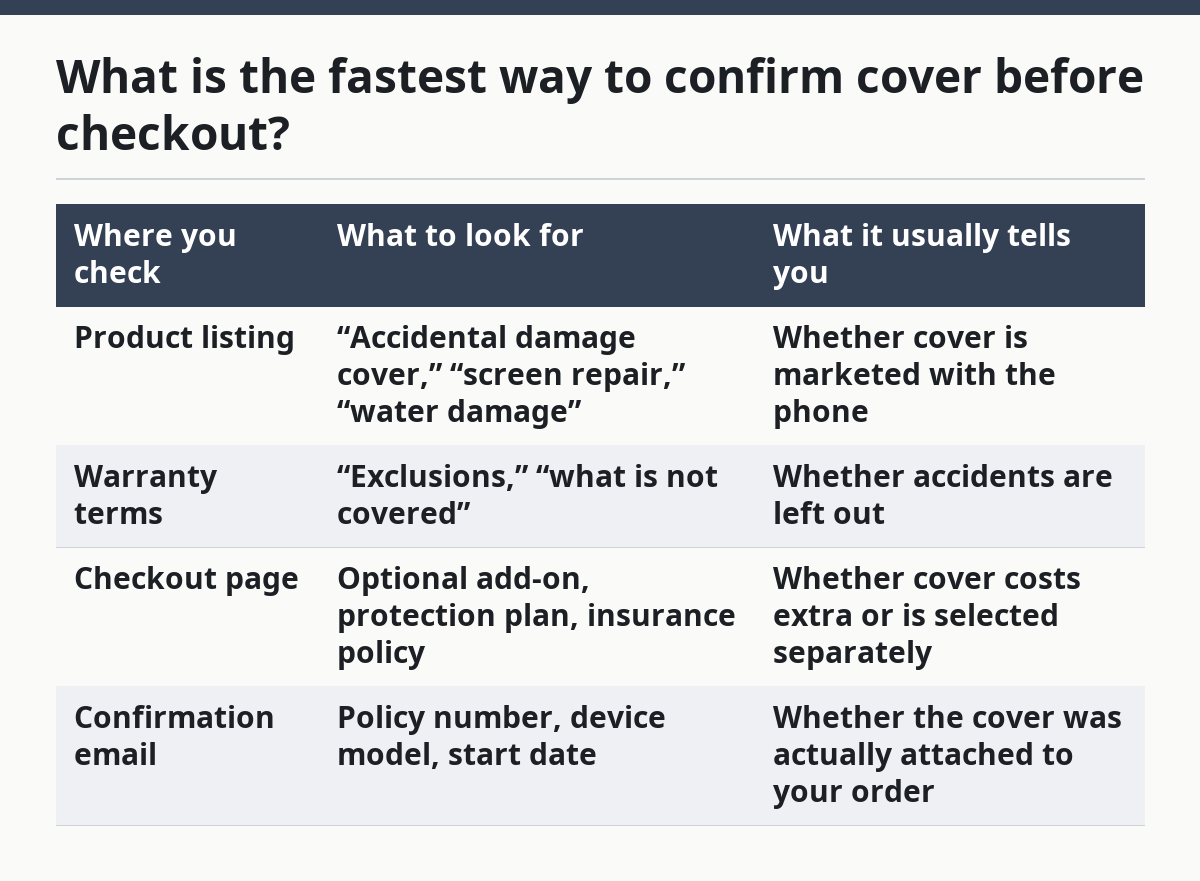
If the checkout page is unclear, do not rely on a banner or badge alone. A badge can mean marketing protection, not a claimable policy. The line that matters is the one that names the cover and ties it to the specific device.
This is also the point where a generic article often goes wrong. It says to “read the fine print” and stops there. That is too vague. The useful move is to check four named places: listing, warranty terms, checkout add-on, and policy email. Those are the places where accidental damage cover either appears in plain language or disappears into exclusions.
For readers comparing phone protection choices on this site, the hub on mobile phone warranty and protection choices is the right next stop for the wider picture. This page is only about spotting accidental damage cover, not comparing every protection plan.
What should I do if the wording is unclear?
Ask for the policy document in writing if the wording is unclear. A sales chat or a store label may sound reassuring, but the claim will be judged on the policy text, not on a casual promise.
Use three direct questions:
- Does this phone include accidental damage cover?
- Does it cover a cracked screen and water damage?
- Is it included in the base warranty or sold as a separate insurance policy?
If the answer is yes, ask for the policy name and the exclusions list. If the answer is no, ask whether an add-on is available at checkout or through the retailer. If you already own the phone, ask for the start date and the proof needed for a claim.
This step matters because some plans use similar words for different products. A device protection plan, an extended warranty, and an insurance policy can all sound close on a sales page, but they do not always cover the same events. One may cover a screen repair after a drop, while another only extends the warranty on parts and labour for a manufacturing fault.
If you are unsure, stop and read the policy before the return window ends. That is the cleanest time to fix a mismatch between what you thought you bought and what the cover actually says.
FAQ
Does mobile phone warranty cover accidental damage?
Usually no. A standard warranty often covers faults, defects, or workmanship, not a dropped phone or a cracked screen from impact. If accidental damage cover is included, the warranty terms or policy summary should say so in plain words.
How do I know if a phone plan includes accidental damage?
Check the plan summary, the checkout add-on, and the policy document for the exact words “accidental damage cover,” “screen repair,” or “water damage.” If those words are missing, the plan may only cover defects or normal warranty repairs. The confirmation email should match the same wording.
Is accidental damage the same as insurance?
Not always. Accidental damage cover can be part of an insurance policy, but it can also be offered as a separate protection plan or add-on. The safest check is the policy wording, because that tells you whether you have insurance terms, exclusions, and a claim process, or just a basic warranty.
Drafted with AI; not yet reviewed by a person.