
How to Track Mobile Phone Restocks After Launch
Last updated: November 18, 2026
Quick Answer: In 3 steps, you can track mobile phone restocks after launch: save the exact model page, turn on push and email alerts, and watch at least one backup retailer.
Mobile phone restocks after launch are hard to catch because the first sold out notice often comes before the next batch appears.
The fix is to set up restock alerts, retailer notifications, and email alerts on the exact stores that sold the phone first.
This guide on How to Track Mobile Phone Restocks After Launch shows what to watch, where to turn it on, and how to tell a real restock from a dead end.
Key Takeaways
- Watch the retailer that sold out first, then add a second store as backup.
- A restock alert is only useful if you choose the right color, storage size, and delivery option.
- Sold-out tracking works best if you check both app alerts and email, since one can lag behind the other.
- Limited drops are often small and brief, so speed matters more than perfect timing.
- If a phone keeps vanishing in minutes, focus on retailer notifications, not refresh loops.
What a mobile phone restock alert actually tells you
A mobile phone restock alert tells you that inventory changed, not that checkout will stay open.
That alert might come from a retailer notification, a push message in an app, or an email alert sent after a sold out notice flips back to available. The gap between those events can be minutes or hours.
Picture this: you’re watching a phone that vanished on launch day, and the store page keeps changing without warning. You need to know which signal matters first, because a restock signal can mean a single unit, a regional batch, or a short limited drop. A restock alert is useful only when you know what it is tied to.
Common signals to watch:
- Add to cart appears again after a sold out notice.
- The page changes from out of stock to available.
- A retailer app sends a push notification for your saved model.
- An email alert arrives from the store’s back-in-stock system.
- The product page shows a new delivery estimate instead of “sold out.”
Here’s the catch: a phone can show as available for one color and still be gone for the storage size you want. A reader chasing the wrong variant wastes the whole restock window.
How do you track a mobile phone restock after launch?
You track a mobile phone restock after launch by saving the exact model on major retailer pages, turning on every alert they offer, and checking for limited drops at the times those stores usually refresh.
That sounds simple because it is simple; the hard part is doing the same thing on more than one store without missing a variant.
Picture this: you’ve already missed launch day, and now you’re trying to catch the next batch before it disappears again. The goal is to build a small net—retailer notification, email alert, and saved product page—so one missed signal doesn’t kill the whole search.
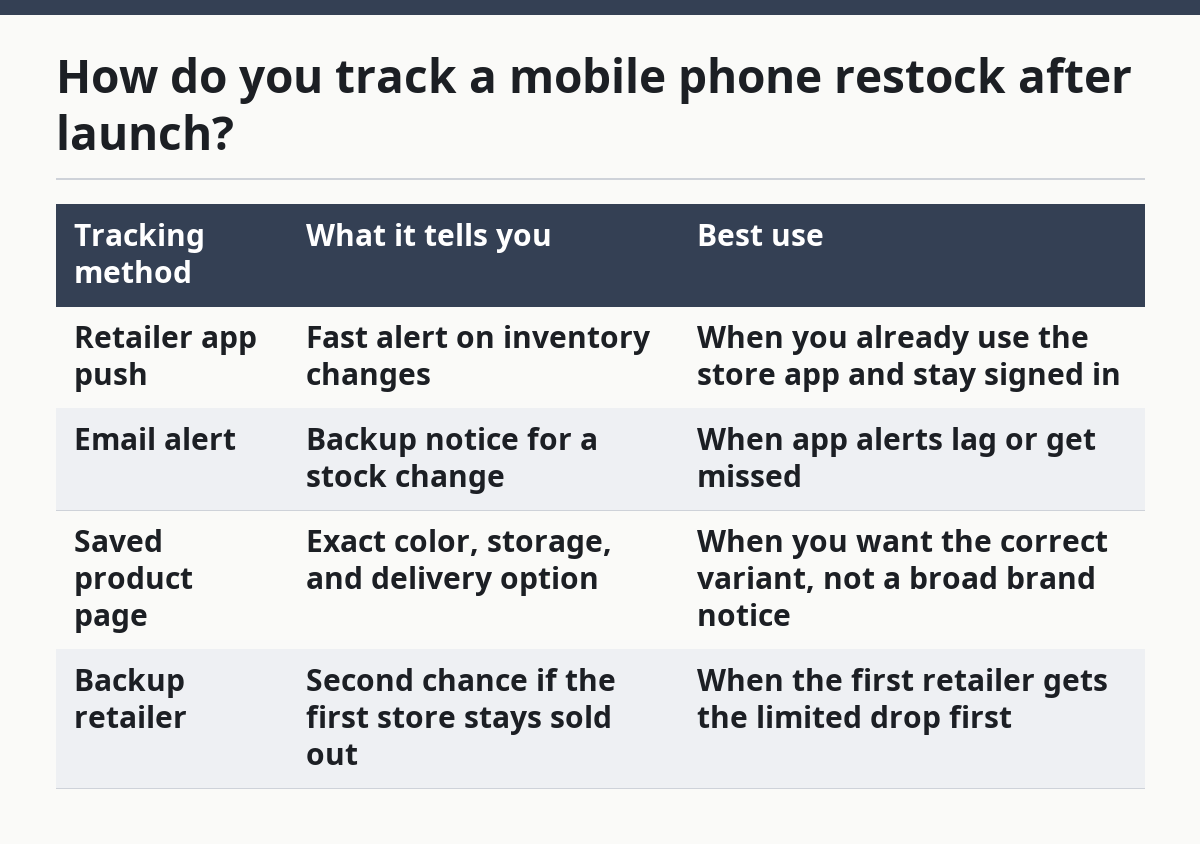
Use this core process:
| Tracking method | What it tells you | Best use |
|---|---|---|
| Retailer app push | Fast alert on inventory changes | When you already use the store app and stay signed in |
| Email alert | Backup notice for a stock change | When app alerts lag or get missed |
| Saved product page | Exact color, storage, and delivery option | When you want the correct variant, not a broad brand notice |
| Backup retailer | Second chance if the first store stays sold out | When the first retailer gets the limited drop first |
- Open the retailer page for the exact phone model, then save the correct color and storage size. A 256GB model is a different inventory line from a 128GB model, so don’t rely on the name alone.
- Turn on the store’s restock alert or back-in-stock email. If the retailer has an app, allow push notifications too, because email can land after the page changes.
- Set a backup alert on a second retailer that sells the same phone. One store may get a limited drop while another stays sold out for days.
- Check the page around the times the retailer tends to refresh stock. For some stores, that may be early morning; for others, it may follow a weekday inventory update.
- When an alert hits, go straight to the exact product page and finish checkout fast. A restock that lasts 5 minutes is not a browsing session.
You do not need a dozen tools. Two stores and two alert types are often enough. The mistake is spreading attention across ten tabs and then missing the one phone that actually came back.
Which retailer notification matters most?

The retailer notification that hits your phone first matters most, but the email alert still matters because it catches the ones that push misses.
Different stores handle restock alerts differently. Some send both. Some only send a sold-out notice when stock drops to zero and a later email when the phone returns.
Picture this: you signed up on a store page, but the alert never reaches you until the phone is gone again. That happens because some systems batch messages, while others send them instantly. If you know the store’s habits, you can decide whether to keep the app open, watch your inbox, or both.
Use these rules when choosing what to trust:
- Push notification first when the retailer app is reliable and already signed in.
- Email alert second when you want a paper trail and a backup if the app is delayed.
- SMS or text alert only if the store offers it and you check your phone often.
- Account dashboard alerts when the retailer keeps restock status inside your profile.
The truth is, one alert channel is never enough. A phone restock can go live at 8:00 a.m., slip away by 8:07, and show up in email after the page is already gone. That’s why the same person should watch at least two channels.
Signs the alert is worth acting on
A real restock signal usually changes the buying button, the inventory line, or the delivery date.
A fake lead often leaves the page unchanged except for a temporary browser glitch.
Specifically, look for:
- A live Add to cart button.
- A changed stock message that names your exact model.
- A new ship date rather than a generic “coming soon.”
- A store app notification that matches the exact color and storage.
What restock signals are worth your time?
The restock signals worth your time are the ones tied to the exact product page, not a vague brand-wide notice.
If a store only says the phone family is back, that does not help much when you need one storage tier or one color.
Picture this: you’re watching three phones at once and one store says “available” without naming the model. That is too loose to trust. You want signals that name the phone, the capacity, and the condition, because those three details decide whether the cart button means anything.
Useful restock signals include:
- A product page with your exact phone name.
- A back-in-stock banner on the same page you saved.
- A notification that names the 128GB or 256GB version you want.
- A delivery estimate that replaces a sold out notice.
- A short-lived limited drop listed in a retailer app.
Weak signals include:
- A homepage banner with no model name.
- A general “new stock arriving” message.
- A social post that does not link to the product page.
- A third-party alert that does not name the storage size.
On the flip side, some signals look weak but matter. A plain email can beat a flashy app banner if the app is late or muted. The store matters more than the style. For background on price and availability timing, see the retailer’s own help pages and stock notices from Apple and Best Buy.
How do sold-out phones come back in stock?
Sold-out phones come back in stock in small batches, often through cancelled orders, warehouse transfers, or limited drops from the retailer.
That means the next restock is usually smaller than launch inventory and may not show up for every color or storage size at once.
Picture this: you missed the first wave, and now you’re waiting for the next one without knowing if it will be 20 units or 2,000. That uncertainty is normal. Restock timing is messy because inventory can move from one fulfillment center to another before the page updates.
What that means for you:
- A sold out notice can clear without warning.
- One color may return while another stays gone.
- A higher-storage model may restock before the base model.
- A retailer may release stock in a limited drop instead of all at once.
If you’re tracking a phone after launch, do not assume the first restock is the last. Keep alerts on for at least a few days, then keep one backup retailer in play for longer. Some phones return in waves, not in one neat batch.
Why timing varies so much
Timing varies because each retailer controls its own warehouse stock, release queue, and site update cycle.
A restock can hit in the morning, during a weekday system refresh, or after a cancelled order batch is released.
That’s why “check later” is too vague. A useful routine has a time window. If one store tends to refresh on weekdays and another posts after email alerts, those patterns are worth more than random refreshing.
How long do restocks usually take?
Restocks usually take anywhere from a same-day return to several days, and sometimes longer if the phone is still scarce.
That range is the honest answer, because a launch-limited phone does not restock on a fixed calendar.
Picture this: you already have a tab open, but nothing has changed for two days. That does not mean the phone is dead. It may mean the store is waiting on a new shipment, or it may be releasing stock in small waves that never hit the front page.
A practical tracking window looks like this:
- Day 1 to 3: watch closely and keep alerts on.
- Day 4 to 7: keep one backup retailer active.
- After a week: watch only the stores that still show restock history or active notifications.
You do not need to stare at the page all day. You need a repeatable check pattern and a quick checkout path. That is what turns a sold out notice into a real chance instead of a daily disappointment.
Common mistakes that make restock tracking fail
The biggest mistake is tracking the wrong version of the phone, and it costs you the restock even when stock exists.
A color mismatch or a storage mismatch is enough to make a valid alert useless.
Picture this: the phone comes back, your alert fires, and the page still says sold out. That is often not a site bug. It means the alert covered the wrong variant or the retailer split stock by region, color, or capacity.
Avoid these errors:
- Watching only one store. You lose the limited drop that lands elsewhere.
- Ignoring the exact storage size. A 256GB restock does not help if you need 128GB.
- Trusting a homepage banner. It may not link to the actual product page.
- Leaving notifications off. A restock alert you never see is useless.
- Refreshing too often. It eats time and rarely beats a good alert system.
Speed matters, but accuracy matters more. A fast click on the wrong listing just returns you to a sold out notice. Save the exact model first, then chase the restock.
The best way to stay ready for the next mobile phone restock
The best way to stay ready for the next mobile phone restock is to keep one saved product page, one backup retailer, and both push and email alerts turned on.
That mix covers the most common restock signals without turning the search into a full-time job.
Picture this: the phone comes back for 10 minutes and the buyer who wins is the one who already knew the exact model and had alerts set before the page changed. That is the real edge. Setup.
If you want the broader timing picture behind launch stock, the hub page on mobile phone launch availability and timing sits above this guide and gives the bigger frame. This page is for the next step: catching the phone after the first wave is gone.
FAQ
How do restock alerts work?
Restock alerts work by watching a product page or retailer account for stock changes and then sending a notice when the status flips.
That notice can arrive as a push notification, email alert, or dashboard message. The catch is that different stores update at different speeds, so an alert may come after the item has already gone back out of stock.
Do sold-out phones come back in stock?
Yes, sold-out phones often come back in stock, but usually in smaller batches than launch day.
Those restocks may come from cancelled orders, warehouse transfers, or limited drops. The exact model, color, and storage size all matter, so one version can return while another stays gone.
How long do restocks usually take?
Restocks can happen the same day or take several days, and some phones stay scarce for much longer.
There is no fixed schedule. Keep alerts on for several days, watch more than one retailer, and pay attention to the times when each store tends to refresh inventory.
Drafted with AI; not yet reviewed by a person.