
How to Read Mobile Phone Return Policies Before You Order
Last updated: November 19, 2026
Quick Answer: in 1 pass, check 4 things first—the return window, restocking fee, opened-box rule, and refund method. If you are reading the article on How to Read Mobile Phone Return Policies Before You Order, those are the lines that matter most before you pay, not after the box arrives. The refund may come back to the card, store credit, or exchange only.
Key takeaways
- The policy is only useful if you check the fine print before checkout, not the summary banner.
- A short return window can matter more than a low phone price.
- Opened-box rules often decide whether you get cash back or only an exchange.
- A restocking fee changes the real cost of backing out, even when the phone itself is unused.
- Return shipping and return authorization can turn a simple return into a two-step process.
What should I look for first?
Start with the return window, the refund method, and the opened-box rule. Those three lines tell you whether the policy is friendly or strict, and they usually sit near the top of the page, sometimes in a 30-day or 14-day section.
A mobile phone return policy is not one paragraph; it is a stack of conditions. I would read it in this order: time limit, condition of the phone, fee, and who pays for shipping. That order saves you from missing a rule hidden in a footnote.
If you need a plain-English guide to phone protection choices, the right next stop is the hub on mobile phone warranty and protection choices. This page is only about return-policy details before you order.
How do I read a mobile phone return policy?
Read a mobile phone return policy by checking the deadline, the condition rules, the fee language, and the refund path in that order. The policy usually tells you more by what it excludes than by what it promises.
Use these steps as a quick method:
- Find the return window on the policy page and note the exact number of days, such as 14 or 30, starting from delivery or purchase.
- Check the opened-box rule and look for words like unopened, activated, used, or in original condition.
- Find the restocking fee line and see whether the fee is fixed, percentage-based, or waived only in certain cases.
- Read the refund method to learn whether money goes back to the original payment method, store credit, or a refund after inspection.
- Look for return authorization requirements such as an RMA number, approval code, or online request form before shipping anything back.
- Check return shipping language to see who pays for postage, label printing, and lost parcels in transit.
- Read the exchange policy to see whether a swap is allowed for a different model, color, or carrier setup.
A policy that looks short can still hide the costly parts in one sentence. A 30-day window sounds generous until the policy says opened phones are exchange only, or that refunds are issued after inspection in 7 to 10 business days.
What does the return window really mean?
The return window tells you how long you have to send the phone back, but the clock may start on delivery, not the day you place the order. That detail matters because a phone ordered on Monday and delivered on Thursday may have a shorter useful window than the headline suggests.
Read for two separate dates: the start point and the cutoff. A policy can say “within 14 days of delivery” or “within 30 days of purchase,” and those are not the same thing when shipping takes 3 to 5 days.
Watch for extra rules tied to weekends and holidays. Some policies count calendar days, not business days, which can shave off time fast if you wait until the last week.
Can I return a phone after opening the box?
You may be able to return an opened phone, but many mobile phone return policies treat opened-box returns differently from sealed-box returns. The policy may allow the return and still reduce the refund, charge a restocking fee, or limit you to an exchange. If the wording is unclear, consult the seller or a consumer-rights professional before you ship anything back, because FTC online shopping advice can help you spot the issue but cannot interpret a seller’s exact policy for you.
This is the part most readers miss. A phone can be “returnable” and still not be refundable in full once the seal is broken, the device is activated, or accessories are missing. The box, charger, cable, SIM tool, and paperwork often have to go back together.
If the policy says “original condition,” do not assume that means “used once is fine.” Some sellers use original condition to mean no scratches, no setup, no account sign-in, and no carrier activation. That language is stricter than it sounds.
What fees can change the refund?
The restocking fee, return shipping charge, and inspection hold can change the refund more than the phone price does. A policy that allows returns can still leave you with less money back than you expected.
Here is a simple comparison of the common policy pieces:
| Policy item | What it tells you | What to watch for |
|---|---|---|
| Return window | How many days you have | Starts at purchase or delivery |
| Restocking fee | Money kept by the seller | Applies to opened phones or all returns |
| Refund method | How the money comes back | Original payment, store credit, or exchange |
| Return authorization | Permission to send it back | RMA number, approval form, label request |
| Return shipping | Who pays to send it back | Free label, customer-paid postage, or deducted cost |
| Exchange policy | What happens if you do not want a refund | Same model only, different color, or no exchange |
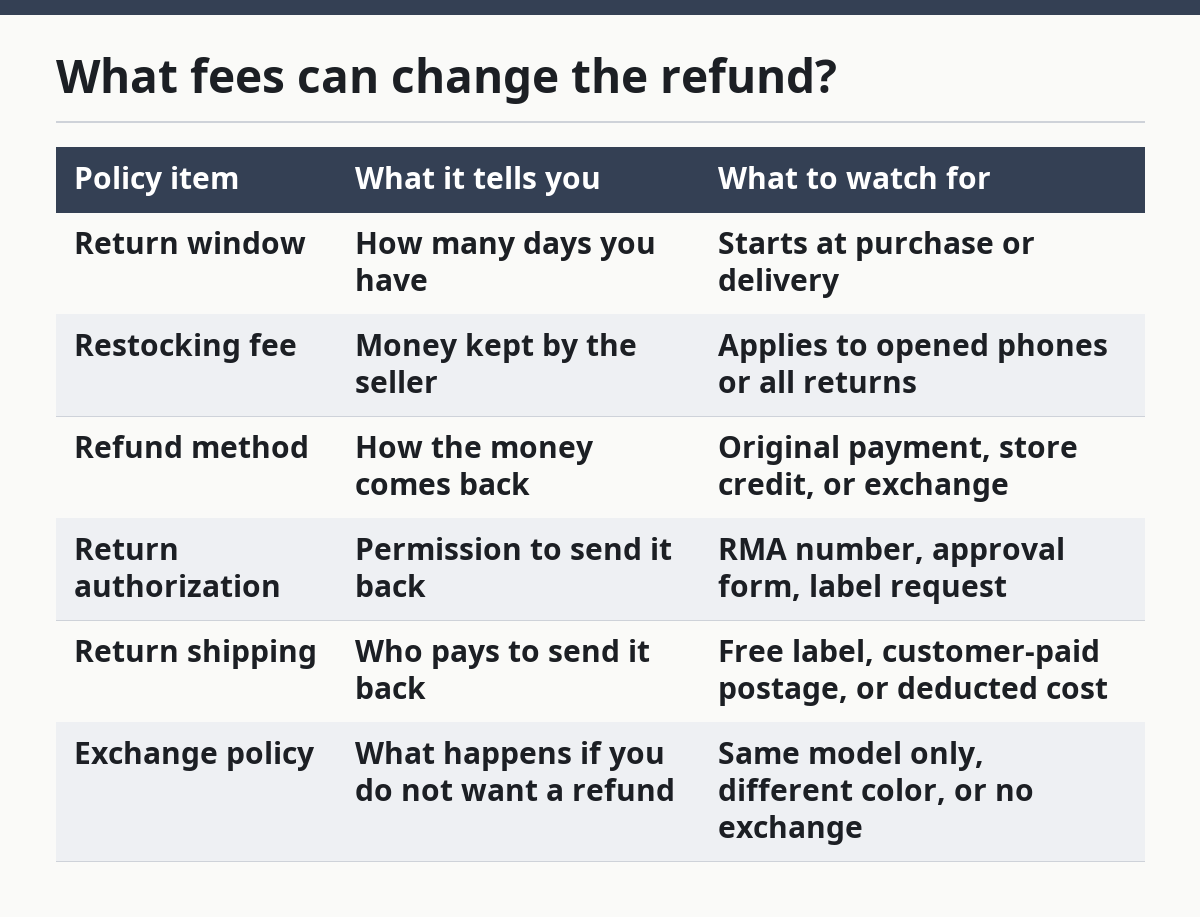
If the policy says the fee is “up to” a certain amount, that is a warning sign. It means the final deduction may depend on the phone’s condition, missing accessories, or whether the device was activated. A free return on paper can still become a partial refund in practice.
How does the refund method work?
The refund method tells you where the money goes and how long it may stay tied up. Most policies send the refund back to the original payment method, but some use store credit or hold the money until the phone is inspected.
Look for a phrase like “after receipt and inspection.” That means the seller may not issue the refund when the tracking number shows delivered. The refund can wait until the box is opened, checked, and approved.
This matters most if you used a debit card, gift card, or split payment. The policy may explain only the main payment method, which leaves the smaller piece of the refund subject to a different rule. If you cannot find the wording in 1 pass, assume the process may take longer than the shopping cart suggests.
What is return authorization and why does it matter?
Return authorization is the seller’s approval step before you ship the phone back. It often comes as an RMA number, a return label, or an online approval form, and missing it can void the return.
This step is easy to skip when you are in a hurry, but it can be the difference between a clean refund and a rejected parcel. If the policy requires authorization, do not send the phone back first and ask questions later.
A phone return often moves through a chain: request approval, get the label, pack the device, send it back, then wait for inspection. That is why a 14-day return policy can feel shorter than it looks. If the seller requires approval within that 14-day window, you need to start early.
Which policy details are easy to miss?
The easiest details to miss are carrier activation, missing accessories, and return shipping responsibility. Those rules often decide the outcome when the rest of the policy looks normal.
A phone can fail return conditions for small reasons:
- The SIM tray tool is missing.
- The box seal is broken and the policy says sealed only.
- The device was activated and the policy limits activated phones to exchange only.
- The charger or cable is not included.
- The seller’s label was not used, so the parcel may be treated as unauthorized under the policy.
Those details cost time and money because they can turn a simple return into a rejected one or a reduced refund. Match the packaging list to the policy line before you send anything back.
When is this policy a bad fit?
This kind of policy is a bad fit if you are likely to open the box, test the phone, and still want the option to walk away without fees. If the seller has a short window, a restocking fee, and an exchange-only rule for opened phones, the policy is strict even if the headline sounds generous.
It is also a poor fit when the policy pushes all shipping cost onto you. A return label can be more expensive than expected, especially if the seller deducts postage from the refund. In that case, the real risk is not just the fee; it is the extra friction if the phone arrives late or the package is missing one accessory.
If you are comparing phone offers, keep this rule in mind: a loose return policy matters more than a flashy promotion when the device may not suit you. Prices change fast, but the return window and fee language decide how much risk you carry after checkout.
How do I check a policy before checkout?
Check a policy before checkout by reading the product page, then opening the returns page, then finding the exact terms for that model. Do not rely on a badge that says “easy returns” unless the linked policy spells out opened-box rules and fees.
Use this quick scan:
- Find the return window in days.
- Find whether the phone must be unopened.
- Find the restocking fee or deduction language.
- Find whether the refund goes to the original payment method.
- Find whether return shipping is prepaid or customer-paid.
- Find whether you need return authorization before mailing it back.
The faster policies to read are the ones that say less and ask less, but that usually means you need to look harder for exceptions. The most expensive surprises usually come from policies that sound broad but add exceptions in the next sentence. A careful read takes 2 or 3 minutes and can save a lot more than that later.
For general consumer shopping guidance, the FTC’s online shopping advice at FTC online shopping advice and the Consumer Financial Protection Bureau explain how refund timing can affect card and bank payments. Those sources will not tell you a seller’s exact mobile phone policy, but they help you recognize the kind of language to slow down for.
Can I return a phone after opening the box?
Yes, sometimes you can, but the policy may treat an opened phone differently from a sealed one. An opened-box return can still come with a restocking fee, an exchange-only rule, or a reduced refund. If the wording is unclear, consult the seller or a consumer-rights professional before you mail the phone back.
Read the exact wording for “opened,” “activated,” and “original condition.” If the policy does not clearly allow opened phones, assume the seller may inspect the device closely and limit what you get back.
Do phone returns always have a restocking fee?
No, phone returns do not always have a restocking fee, but many policies mention one for opened or non-defective returns. The fee may be waived for unopened phones or for items returned under a separate defect policy.
The key is the trigger. If the policy ties the fee to opened packaging, missing accessories, or changed condition, you need to know that before you order. A no-fee return on paper can still hide a deduction in the fine print.
How long do I have to return a new phone?
It depends on the seller, and the deadline may be 14 days, 30 days, or another period set in the policy. The clock may start on delivery, not purchase, so the date that matters can be later than the checkout date.
Read the policy for the exact start point and whether weekends count. If you want the option to return the phone, do not wait until the last few days to open the box and check the terms.
Drafted with AI; not yet reviewed by a person.