

Mobile Phone Price Research Methods: The Complete Guide
Last updated: November 18, 2026
In short: a practical way to research a mobile phone’s price is to compare the maker’s current store listing, two major retailers, and one trusted review or price-tracking source before you buy. That usually tells you the current price, what is included in the box, and whether a deal is actually a deal.
Mobile Phone Price Research Methods — The Complete Guide helps you compare prices the right way if you are choosing a new device today. The right method is not “search more.” It is “check the right places in the right order.” For most buyers, that means starting with the manufacturer’s site, then checking Apple, Samsung, Google, Best Buy, Amazon, and a price history source such as CamelCamelCamel or Keepa when the model is sold there.
I write and edit consumer-tech buying guides, so I know where price comparisons go wrong: people compare base storage to expanded storage, ignore trade-in credits, or chase a temporary sale on a version they do not actually want.
Key takeaways
- The most useful price research starts with the exact model, storage size, and carrier status, not the headline number.
- Manufacturer stores usually give the cleanest baseline; retailers often win on promos, bundles, and financing.
- Trade-in offers can make a higher listed price cheaper in practice, but only if the credit is easy to use and not tied to restrictive terms.
- Price history matters most on older models, renewed devices, and color variants that cycle in and out of stock.
- A good comparison includes total out-of-pocket cost, not just sticker price.
What you are actually trying to find
You are trying to find the lowest real cost for the exact model you want.
That means the comparison has to lock down five details before price shopping starts:
- Model name — for example, iPhone 15, Galaxy S24, or Pixel 8a.
- Storage size — 128 GB and 256 GB can differ enough to change the value equation.
- Carrier lock status — opened, AT&T, Verizon, or another network.
- Condition — new, renewed, refurbished, or open-box.
- Included extras — charger, cable, case, trade-in credit, gift card, or financing terms.
A generic article will tell you to “compare prices.” That is too vague to help. The real method in Mobile Phone Price Research Methods — The Complete Guide is to compare the same item across the same channel on the same day. A listed price on a carrier site can look lower than a factory-opened version, but the carrier may require activation, bill credits over 24 or 36 months, or a trade-in that you cannot use unless your old device meets a strict condition.
The quickest rule is simple: if two listings do not match on storage, carrier, and condition, they are not comparable. A $699 opened 128 GB model and a $699 carrier-locked 256 GB model are not the same deal, even if the number on the page matches.
The cleanest way to compare mobile phone prices
The cleanest method is to build your own mini comparison table from three sources: the manufacturer, a major retailer, and a price-tracking source. That gives you the current baseline, the promotional ceiling, and the recent price floor.
Start with the manufacturer’s store because it usually tells you the official configuration and the full MSRP-equivalent pricing structure. Then check a retailer such as Best Buy or Amazon to see whether the same phone is discounted, bundled, or available in a different fulfillment channel. If you are looking at a model that has been on sale for months, check a price-history tool so you know whether the current discount is real or just a small dip from a previous sale cycle.
The method works best when you capture the exact page details:
- model
- storage
- color
- carrier status
- condition
- current listed price
- tax estimate
- shipping
- return window
- trade-in terms
A lot of buyers stop at the sticker price and miss the hidden spread. A seller can make one listing look cheaper by reducing shipping, while another seller makes the device look cheaper through an instant coupon that disappears at checkout. A proper method treats the checkout page as the source of truth, and if the trade-in or financing terms are unclear, it is wise to consult the seller’s published policy or a qualified professional before deciding. One useful source for checking your rights around online purchases and returns is the U.S. Federal Trade Commission: https://consumer.ftc.gov/.
Here is the basic rule I recommend: if the device is new and widely sold, compare the maker’s store against two major retailers. If it is an older model or a renewed unit, compare at least one marketplace with a clear condition label and one price-history source. If it is carrier-specific, compare the carrier deal against the opened version plus a plan discount, because one may win only after 24 months of bill credits.
Manufacturer store or retailer: which price should you trust first?
The manufacturer store should come first because it gives the most reliable baseline for the device itself, while retailers win for promotions and bundles. That split matters because a baseline is not the same thing as the cheapest checkout total.
A manufacturer listing is useful for three reasons. First, it usually clarifies the exact configuration without the clutter of third-party seller tags. Second, it gives the cleanest view of financing, trade-in, and color or storage combinations. Third, it is the easiest place to compare current-generation models because the page reflects the brand’s own configuration logic rather than a reseller’s bundle strategy.
The downside is that manufacturer stores are often not the cheapest final stop. They may be less aggressive on temporary discounts, and some brands keep bundle value behind their own accessories or financing programs. That can make the page look simple but not always competitive.
Retailers such as Best Buy, Amazon, and Walmart can beat the maker on price, but their offers need more scrutiny. A retailer may list a lower price on a locked carrier version, an open-box unit, or a promotion tied to a specific payment plan. Amazon and Best Buy can also vary by seller, which means the same product name may hide different warranty or return conditions. Walmart often adds marketplace listings that need closer attention to seller identity and fulfillment.
Use this rule:
- Choose the manufacturer store when you want the cleanest configuration, the safest baseline, or a direct trade-in path.
- Choose a retailer when you want the best chance of a short-term discount, bundle, open-box option, or alternate checkout terms.
Who should skip the manufacturer-first method? Anyone buying a last-year model, a renewed phone, or a carrier deal with bill credits. In those cases, the brand store often gives you a neat but incomplete picture. You need the market price, not just the official one.
How do trade-ins change the real price?

Trade-ins can cut the real cost sharply, but only when the credit is immediate, easy to apply, and not buried in a long billing schedule. That makes trade-ins valuable, but also easy to misread.
The first mistake is counting the trade-in credit as cash when it is actually a monthly bill credit. Those are not the same thing. A 24- or 36-month credit schedule ties your savings to keeping the line active for the full term. If you cancel early, switch carriers, or fail to keep the required plan, part of the value may disappear.
The second mistake is comparing a trade-in offer without checking the condition rules. A cracked screen, battery wear, missing activation lock removal, or a mismatched IMEI can reduce the offer or disqualify the device entirely. The seller’s trade-in terms matter as much as the headline credit.
The third mistake is ignoring timing. A trade-in promotion may be generous during a launch window or holiday event, then shrink later. The phone you want might cost more up front but less in total after a high-value trade-in window. That is why the decision should be made from the checkout total, not the banner ad.
Trade-ins are strongest for:
- buyers upgrading from a recent flagship
- people staying in the same ecosystem
- shoppers who can satisfy every trade-in condition
- buyers who plan to keep the same carrier long enough to receive all credits
Trade-ins are weak for:
- buyers who want to switch carriers soon
- people whose old device has screen damage or battery issues
- anyone who prefers a clean, one-time purchase
- shoppers comparing opened pricing only
If you want the simplest answer, treat trade-in value as a bonus, not the foundation of your search. First price the phone as if you were paying full retail. Then subtract the trade-in only after you confirm the offer is real, immediate, and usable.
Is price history worth checking for a new phone?
Price history is worth checking when the model has been on the market long enough for meaningful discount cycles, which is often the case for older flagships, midrange models, renewed devices, and accessories. It is less useful on a brand-new launch week product because the price has not had time to move much.
Price-history tools such as CamelCamelCamel or Keepa are most useful for Amazon listings. They show whether a drop is part of a normal pattern or a rare dip. That matters because a listing can look “on sale” even when it has simply returned to its usual street price.
The benefit is not just savings. Price history helps you avoid bad timing. If a model routinely falls during major sale periods, you can decide whether to wait. If the current price sits near the recent floor, you can buy with more confidence.
But price history has limits:
- it only works when the tool has enough historical data
- it does not always reflect carrier promotions
- it cannot tell you whether a current stock-keeping unit is better or worse than a later revision
- it may miss open-box or marketplace pricing shifts
A smart buyer uses price history as a filter, not a final verdict. If a model is on sale today and the chart shows that the same listing often moves back up within a few weeks, the discount is probably real enough to act on. If the chart shows only tiny swings, then the “sale” is probably normal pricing dressed up with marketing.
This method is most useful for budget-conscious shoppers who are not married to a specific launch day. It is less useful for someone who needs a phone immediately and cares more about availability, color, or carrier compatibility than about squeezing out one more discount cycle.
The honest side-by-side
The manufacturer-first method wins on clarity. The retailer-first method wins on price opportunities. If I had to choose one as the default for most buyers, I would start with the manufacturer and then verify with retailers.
| Criteria | Manufacturer store | Major retailer | Winner for [condition] |
|---|---|---|---|
| Configuration clarity | Exact model, storage, and carrier options are usually spelled out cleanly | Can be mixed with seller, bundle, or open-box labels | Manufacturer store for exact-match shopping |
| Base price baseline | Often the official reference point | May undercut it during promos | Manufacturer store for baseline comparison |
| Chance of short-term discount | Moderate, depending on launch cycle and trade-in offers | Higher during sales events and clearance windows | Major retailer for promo hunters |
| Trade-in simplicity | Usually direct and tied to the brand ecosystem | Can vary widely by seller or carrier tie-in | Manufacturer store for straightforward trade-ins |
| Return policy clarity | Usually easy to locate in one policy set | Depends on seller, fulfillment, and condition | Manufacturer store for low-ambiguity returns |
| Open-box or renewed options | Limited or absent | Common on major retail platforms | Major retailer for condition-flexible buyers |
| Carrier-specific deals | Available, but not always the strongest | Often better on activation bundles | Major retailer for activation promos |
| Risk of misleading comparisons | Lower | Higher if seller, condition, or bundle is not checked | Manufacturer store for cautious buyers |
| Best use case | First-pass research and exact configuration matching | Final price hunt before checkout | Depends on your stage of shopping |
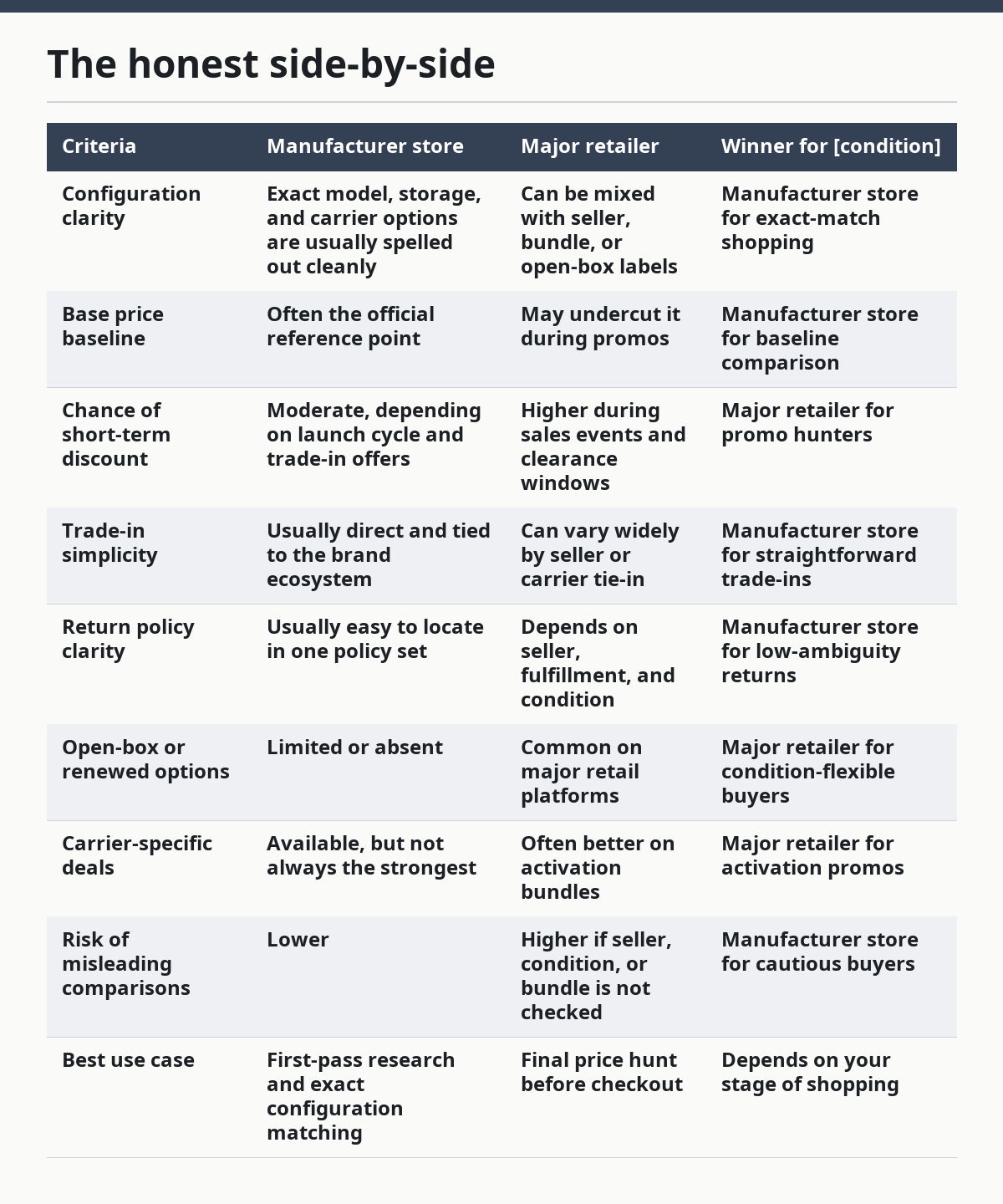
The table points to the core truth: one source is rarely enough. The manufacturer store gives the cleanest starting line; the retailer often gives the better ending number. If you stop at either one, you risk paying too much or missing a better configuration.
The biggest weakness on the retailer side is inconsistency. A listing can hide a seller name, a different warranty path, or a condition that is technically “new” but not identical to the maker’s direct listing. The biggest weakness on the manufacturer side is missed value. A brand store can be orderly while still failing to beat a sale at Best Buy or Amazon.
Which method is best if you want the lowest real cost?
The lowest real cost usually comes from a three-step method: compare the manufacturer, compare one or two major retailers, then confirm the total at checkout with tax, shipping, and trade-in terms included. That method is better than any single site because it captures the price that actually leaves your wallet.
If you are buying a current flagship such as an iPhone, Galaxy S-series model, or Pixel flagship, the manufacturer store is the best anchor. It gives you the exact configuration and the cleanest terms. Then check major retailers for holiday discounts, gift-card incentives, open-box units, and activation promos. Those offers can matter more than a small list-price difference.
If you are buying a midrange device or an older flagship, the retailer often becomes more important than the brand store. These phones move through sale cycles more frequently, and the best price may come from a marketplace or an open-box listing rather than the maker.
The lowest-cost method is not the same as the safest method. A refurbished or open-box unit may save money, but it also adds uncertainty about battery health, cosmetic wear, accessories, and warranty length. That is why the best method for a bargain hunter is not automatically the best method for a risk-averse buyer.
A practical framework:
- Decide the exact model and storage.
- Check the manufacturer’s store.
- Check two retailers.
- Compare the checkout total, not the headline price.
- Add trade-in only after verifying the terms.
- Use price history if the device has been on sale before.
This method is wrong for people who want a one-click answer and are willing to pay more for convenience. It is also wrong for buyers who need same-day availability above all else. In those cases, the “best price” is the one you can secure locally or immediately, not the one that looks best on paper.
What to do when the price looks good but the deal is bad
A low price is a bad deal if the terms are wrong, and that happens more often than most buyers expect. The fastest way to lose money is to chase a number without reading the fine print.
Watch for these red flags:
- Carrier lock-in — a lower price tied to a long activation term may stop you from switching later.
- Bill credits instead of instant savings — the savings may depend on staying enrolled for 24 or 36 months.
- Open-box uncertainty — condition, included accessories, and warranty may vary.
- Marketplace seller ambiguity — the listing may not be sold or fulfilled by the retailer you trust.
- Trade-in restrictions — the offer may require the old device to be powered on, factory-reset, and free of damage.
- Accessory bundling — the “deal” may include items you do not need.
The right response is not to reject all deals. It is to rank them by total value and certainty. A slightly higher price with clear terms can be smarter than the lowest number with hidden restrictions. That is especially true when the device will be your primary tool for work, travel, or two-factor authentication.
This is also where the best comparison method becomes a decision method. If one option is $50 less but ties you to a carrier you do not want, the difference may not matter. If a retailer gives you a lower price but the trade-in requires a perfect condition device and a 36-month billing cycle, the cost may rise later. Good price research catches those traps before checkout, not after.
When should you stop researching and buy?
You should stop researching when the exact model, storage, and condition you want are all within a normal market range and the savings from more searching are smaller than the value of your time. For many buyers, that point comes sooner than they think.
Here is a clean stopping rule:
- Buy when the current offer matches the configuration you want.
- Buy when the checkout total is competitive against at least two other sources.
- Buy when the return policy is acceptable.
- Buy when the trade-in terms are easy to meet.
- Buy when the device is in stock in the color or finish you actually want.
Keep searching only if one of these is true:
- you have seen the same model dip before and can wait
- the offer depends on a carrier or plan you do not want
- the listing hides seller or condition details
- a major holiday sale is close
- you are considering a renewed or open-box unit and want a better warranty path
The biggest error is treating research like a hobby instead of a decision tool. Once the deal meets your requirements, extra searching often just creates doubt. A phone that fits your budget, carrier, and storage needs is more valuable than a slightly better number on a different day.
Exception scenarios that change the answer
The recommendation flips in four common cases. If any of these apply, the default method changes.
First, carrier subsidies can make the carrier page the better starting point. If the savings are tied to a line activation you already need, the carrier deal may beat an opened purchase even when the sticker price looks worse.
Second, renewed or refurbished buying changes the research order. In that market, condition, battery health, return period, and warranty matter as much as price. A marketplace with clear grading and return rules may be more useful than the manufacturer store.
Third, launch-week buying favors the manufacturer and major retailers over price history. Early on, there may not be enough history to trust a chart, and the deciding factor becomes stock, trade-in value, and immediate availability.
Fourth, very old models can make price history and marketplace comparison more important than the brand store. When the maker no longer emphasizes the device, the market price may live mostly in resale or clearance channels.
These are not edge cases for the sake of completeness. They are the situations where a buyer can make the wrong call by using the default method too mechanically.
The verdict: which method to choose and why
Choose the manufacturer-first, retailer-second method if you want the safest comparison, the cleanest configuration match, and a reliable way to spot whether a promotion is real. Choose the retailer-first method if you are hunting discounts, open-box units, or carrier promos and you are willing to read the fine print. Neither if you are comparing mismatched storage sizes, ignoring carrier lock status, or refusing to check the checkout total.
If you want the shortest possible answer: start with the maker’s store, confirm with two retailers, and only then decide. That is the most dependable way to research a mobile phone price without getting fooled by a headline discount or a hidden term.
Quick checklist before you buy
A good price check should answer these questions before you click purchase:
- Is this the exact model and storage I want?
- Is it opened or tied to a carrier?
- Is it new, open-box, renewed, or refurbished?
- What is the checkout total after tax and shipping?
- Is the trade-in credit instant or spread over time?
- Does the return policy give me enough room to inspect the device?
- Is the current deal better than the recent price pattern?
If the answer to any of those is unclear, keep researching. If they are all clear, the deal is ready for a decision.
FAQ
How many stores should I compare before buying?
Compare the manufacturer’s store and at least two retailers. That gives you a baseline, a competing price, and a second check on promotions or bundle terms.
Should I trust the listed price or the checkout total?
Trust the checkout total. Taxes, shipping, carrier requirements, and trade-in rules can change the real cost after the product page looks finished.
When is price history most useful?
Price history is most useful on older flagships, midrange phones, renewed devices, and Amazon listings that have enough past pricing data to show a pattern.
Are trade-in credits always worth it?
No. Trade-ins are best when the credit is immediate or easy to use. They are less useful when the savings are spread over many months or depend on strict plan requirements.
What is the safest way to avoid a bad deal?
Check the exact model, storage, carrier status, condition, return window, and final checkout total before you buy. If any of those details are unclear, keep comparing.
Drafted with AI; not yet reviewed by a person.