

How to Use Filters to Narrow Mobile Phone Listings
Last updated: November 18, 2026
In short: use the filter menu to cut a huge list of mobile phone listings down by brand, storage size, RAM, network, and condition, then sort what remains so you compare like with like. If a listing site lets you stack filters cleanly, you can often get from 2,000 results to a short, relevant set in under 5 minutes.
Key Takeaways
- The filter menu can quickly cut mismatched listings down to the phones that fit your needs.
- Brand, storage size, RAM, network, and condition usually match how phone listings are written.
- Filter out easy-to-misread specs first, then confirm the title matches the filtered results.
- Treat storage as a capacity filter, not a price shortcut, when you compare listings.
Start with the filter menu, not the product page
The filter menu can quickly cut mismatched listings down to the phones that fit your needs. Open the listing page first, then look for the sidebar, drawer, or top-bar controls that let you narrow by brand, storage size, RAM, network, and condition before you read individual ads.
The reason this matters is simple: listing titles are messy. One seller writes “Galaxy,” another writes “Samsung Android,” and a third only mentions the model number. Filters translate those variations into a clean search path. On many marketplaces, the filter panel sits above the results on mobile and in a left rail on desktop, so the exact placement changes, but the logic does not.
Use the filter menu in this order:
- Pick the broadest matching brand first, such as Apple, Samsung, Google, or Xiaomi. This removes unrelated listings immediately and usually cuts the results by a large margin.
- Add storage size next, because it is one of the clearest spec fields on a listing. A 64 GB phone and a 256 GB phone may look similar in the title, but they are not the same product.
- Add RAM if the site offers it. This is especially useful on Android listings, where 4 GB, 6 GB, 8 GB, and 12 GB versions of the same model can all appear together.
- Set network compatibility, such as opened, 5G, or a specific carrier lock. This avoids listings that cannot work on your network.
- Finish with condition, like new, refurbished, open box, or used.
A useful rule: apply the filters that remove the most noise first. If a site lets you sort by “Best match” and “Newest,” ignore that until your filters are set. Sorting before filtering usually just reorders bad results.
This is the part many generic guides miss: filters are not about finding the perfect listing in one pass. They are about shrinking a messy catalog into a list you can actually compare. If you want the bigger research framework, the hub on mobile phone price research methods sits above this page.
Which filters matter most on phone shopping sites?
The most useful filters are brand, storage size, RAM, network, and condition, because they match the way phone listings are usually written. If a site offers dozens of lesser filters, those five usually do most of the work and save you from clicking through pages of irrelevant results.
Brand comes first because it is the cleanest way to narrow a market full of mixed models. A shopper looking for an iPhone does not need Android flagships in the same results set. A shopper looking for a Samsung Galaxy S-series model does not need every Galaxy A-series listing mixed in. Brand is a blunt filter, but it is effective.
Storage size comes next. Common listing fields are 64 GB, 128 GB, 256 GB, and 512 GB, and the difference changes both price and usefulness. If you know you want enough room for offline music, photos, or video, filtering by storage can prevent a lot of false starts. It also keeps you from comparing a 64 GB listing against a 256 GB listing as if they were equal. For general storage terminology, see the Mobile phone overview on Wikipedia: https://en.wikipedia.org/wiki/Mobile_phone. For storage-capacity concepts, see NIST’s glossary: https://www.nist.gov/pml/owm/metric-si-prefixes.
RAM matters when the market has multiple memory variants for the same model. On many Android listings, 4 GB is entry-level, 6 GB is a practical middle ground, and 8 GB or more is often used in higher-spec variants. That does not make one setting “best” for everyone, but it does help separate the listings that fit your expected level of multitasking from the ones that do not.
Network filters protect you from compatibility problems. “Opened” is often the broadest label if you want flexibility, but it still pays to check the carrier and region notes in the listing. “5G” matters if you want that network support. Carrier-specific filters matter if you are buying through a network-linked marketplace or a seller with region-lock details. For network definitions, the FCC’s opened-device guidance is a useful reference: https://www.fcc.gov/consumers/guides/unlocking-your-mobile-phone.
Condition is the last of the core five because it changes what the listing means. A “new” phone, an “open box” unit, a “refurbished” model, and a “used” handset should not automatically be treated as the same thing, so it is safest to check the seller’s definitions and, if needed, consult a professional or the marketplace’s support guidance. Refurbished can be fine, but only if the listing explains who refurbished it and what parts or warranty are included. If that information is missing, the filter may have narrowed the list but not the risk. For consumer guidance on refurbished and used electronics, see the FTC: https://consumer.ftc.gov/articles/buying-used-electronics.
A detail worth watching: some sites bury these filters under “More filters” or “Spec filters.” If a site hides them, look for a way to expand all options before you decide the site lacks them.
How do I avoid irrelevant phone listings?
You avoid irrelevant mobile phone listings by filtering out the specs that are easy to misread, then checking the listing title against the filter results. This cuts down on near-matches, duplicate ads, and “compatible accessory” results that can clutter a search on marketplaces.
The biggest mistake is trusting keywords in the title more than the actual filter labels. Sellers often write titles to attract clicks, not to describe the phone cleanly. A title might mention “Pro Max” or “Ultra” while the listing details reveal a smaller storage version than you wanted. The filter panel is your control; the title is just a clue.
Watch for these common problems:
- Model-family confusion. A search for “Galaxy S24” can still surface the S24+, S24 Ultra, and sometimes older S23 listings if the seller tags them loosely. If the site allows model-level filters, use them.
- Storage mismatches. A listing may say “128 GB” in the title but show a different storage option in the details. If the site has a structured storage filter, use that field rather than trusting headline text.
- Carrier confusion. Listings can be “opened,” “SIM-free,” or tied to a carrier. These are not always identical. If you need freedom to switch networks, do not skip the network filter.
- Condition drift. “Excellent” and “used” are not standardized across every marketplace. One seller’s “excellent” is another seller’s “light wear.” Condition filters help, but the listing description still matters.
A practical trick is to filter, then scan the first 10 to 15 results for pattern errors. If you see repeated mismatches, the site may have weak data quality, and you should tighten the search terms as well. For example, pairing the exact model name with brand plus storage size usually works better than searching a broad family name alone.
This is also where you should use exclusion filters if the site offers them. Some marketplaces let you remove specific brands, refurbs, or locked devices. That is useful when the first pass still shows too many near-matches. A clean results page is not the one with the most listings; it is the one with the fewest irrelevant ones.
Narrow by storage size without cutting out the right model
Storage size narrows phone listings best when you treat it as a capacity filter, not as a price filter. A 128 GB listing is not automatically the right middle ground, and a 512 GB listing is not automatically overkill; the right number depends on how the site labels variants and how much spread the marketplace shows between storage tiers.
Start by identifying the storage options the site actually uses. The common tiers are 64 GB, 128 GB, 256 GB, and 512 GB, though some listings add 1 TB on premium models. If you are comparing multiple models, make sure the filter is showing the same storage tier across all of them. Otherwise, you may compare a lower-storage flagship against a higher-storage midrange device and miss the real difference.
Use storage filters in three stages:
- Choose your minimum acceptable size. If you want a listing that can hold a lot of apps, photos, and video, set the lower bound rather than selecting every size in the range. That keeps the results from being flooded by small-capacity models.
- Match the storage tier across candidates. Compare 128 GB to 128 GB, not 128 GB to 256 GB. This avoids a false sense that one model is cheaper when it is really just smaller.
- Check whether the site separates internal storage from expandable storage. Some Android models use microSD support, but many modern phones do not. If the listing does not mention expansion, assume the built-in storage is what you get.
The trade-off is straightforward: tighter storage filters reduce noise, but they can also hide a strong listing in a less common capacity. If you set only one exact storage size, you may miss a model that appears in 256 GB but not 128 GB. If you are still learning the market, it is often better to set a range of two tiers, such as 128 GB and 256 GB, and then compare those results side by side.
One thing to avoid: do not use storage size as a proxy for quality. A phone with 64 GB can still be a strong match for a light user, and a 512 GB listing can be a poor buy if the condition is weak or the battery is worn. Storage is one filter, not the verdict.
For formal spec language, the relevant terms are internal storage and storage capacity. If a site uses shorthand like “ROM,” treat that as a display label, not a guarantee that the listing is fully accurate.
Use RAM and network filters to compare the right variants
RAM and network filters help you compare the same model in the right configuration instead of mixing different trims together. That matters because a listing page can show several versions of the same handset, and the model name alone does not tell you whether you are looking at 4 GB RAM, 6 GB RAM, or an opened 5G unit.
RAM is especially useful when the listing site carries full spec fields. On Android listings, the same phone family may appear in several memory versions, and the difference can affect how many apps stay open or how smooth the phone feels under load. If the filter menu lets you choose exact RAM sizes, use it. If it only lets you choose broad ranges, pick the smallest range that still covers the version you want. A 4 GB filter and an 8 GB filter can produce very different result sets.
Network filters need careful reading. “Opened” usually means the phone is not tied to one carrier, but it does not automatically guarantee every regional band or every 5G variant. “5G” means the device supports that network type, yet a 5G label alone does not tell you whether it works on your local carrier. If the listing site offers a carrier filter, use it alongside the network filter rather than instead of it.
A few concrete ways to use these filters well:
- If you want a flexible handset, select opened first, then add the network type you need.
- If you are comparing Android variants, set RAM before reading titles so you do not accidentally mix 4 GB and 8 GB listings.
- If the listing site shows both SIM-free and opened, read the definitions on that site, because marketplaces do not always use those labels in the same way.
- If the page offers dual SIM or regional model filters, use them only when they matter to your carrier or travel needs.
The trade-off here is precision versus availability. The more exact your RAM and network filters are, the fewer listings you will see. That is useful if you already know your minimum spec. It is less useful if you are only trying to understand the market and want to see which variants are common. In that case, start broad, then tighten the filter after you see the pattern.
A good habit is to compare two versions of the same model with identical storage and condition, then change only the RAM filter. That makes the difference visible instead of buried in unrelated listing noise.
Use condition filters carefully on refurbished and used listings
Condition filters are the quickest way to separate new, refurbished, open-box, and used phones, but they are also the easiest to misunderstand. A condition label narrows the list; it does not standardize the seller’s grading system.
Start with the broad condition group that matches your tolerance. If you want only untouched stock, filter for new. If you are open to pre-owned devices, include refurbished and used, then read the seller’s grading terms. If you are shopping a marketplace that uses “like new,” “excellent,” or “good,” treat those as seller-specific labels unless the site defines them clearly.
The key thing to check is what sits behind the condition tag:
- Refurbished may mean the device was inspected, repaired, cleaned, and reset.
- Open box usually means the package was opened, but the phone may show little or no wear.
- Used can range from barely visible marks to heavy cosmetic wear.
- For parts or not working should be excluded unless you are specifically buying for repair.
This is where a lot of shoppers get misled. A neat results page can hide a bad listing if the condition filter is too broad. A “refurbished” device without details on battery, screen, or warranty is not the same as a refurbished device with a clear service grade and return window. The filter should help you reach the listing; the listing itself should still explain the condition.
If the site has a checkbox for seller rating, return policy, or warranty length, those are useful after the condition filter. They are not substitutes for it. The condition filter tells you what kind of device you are looking at; the seller details tell you how much trust to place in the listing.
One honest limitation: condition filters work best on sites with structured data. On looser marketplaces, sellers can mislabel listings, and the filter will only be as good as the seller input. When that happens, sort the results by condition, then manually inspect the first few listings before you commit to the page.
A quick workflow that keeps searches tight
A reliable listing search follows a simple 5-minute pattern: brand first, storage second, RAM third, network fourth, condition fifth. This sequence gives you a results page that is narrow enough to compare but broad enough to avoid missing the variant you actually want.
To make the process easier, check the filters on one results page before jumping to another marketplace. Mobile phone listing sites often reuse similar controls, so once you know where brand, storage size, RAM, network, and condition live, the same workflow usually works again. If a site hides the options well, the page on can help you frame the comparison after the filtering step.
If you are comparing two or three listings, open them in separate tabs and keep the filter set visible in the background. That makes it easier to spot whether the phone is the same model in a different storage tier or a different variant altogether. For a general market overview, the mobile phones page is also useful context before you decide which specs matter most.
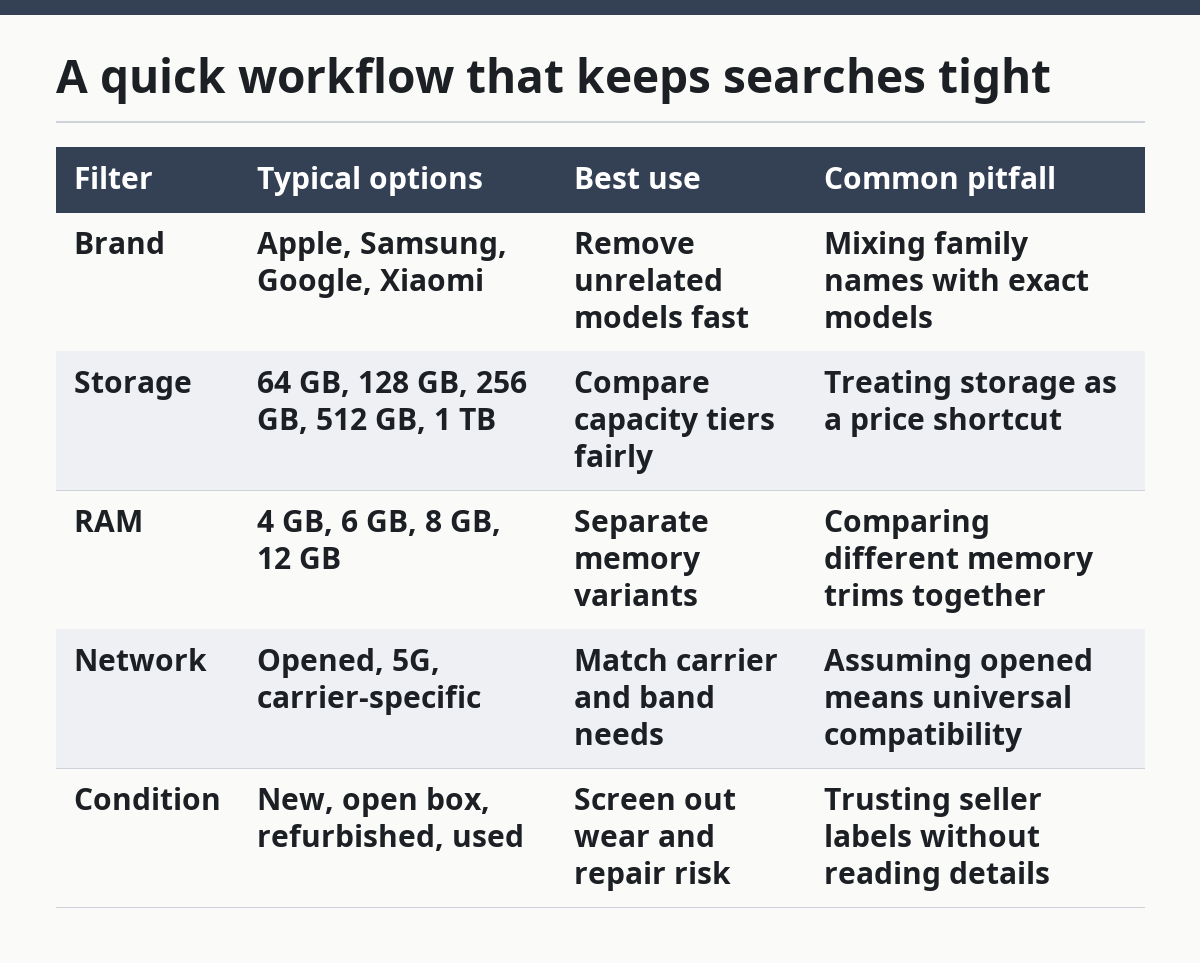
For shoppers who want a quick reference, use this comparison table:
| Filter | Typical options | Best use | Common pitfall |
|---|---|---|---|
| Brand | Apple, Samsung, Google, Xiaomi | Remove unrelated models fast | Mixing family names with exact models |
| Storage | 64 GB, 128 GB, 256 GB, 512 GB, 1 TB | Compare capacity tiers fairly | Treating storage as a price shortcut |
| RAM | 4 GB, 6 GB, 8 GB, 12 GB | Separate memory variants | Comparing different memory trims together |
| Network | Opened, 5G, carrier-specific | Match carrier and band needs | Assuming opened means universal compatibility |
| Condition | New, open box, refurbished, used | Screen out wear and repair risk | Trusting seller labels without reading details |
If you want more context on carrier status and purchase terms, the phone opening page is a useful follow-up. If you are still deciding between buying new or pre-owned, the refurbished phones page explains the trade-offs in more detail.
The best results usually come from a narrow, structured filter set plus a quick manual scan of the top listings. That combination is faster than reading every ad, and it is safer than trusting one keyword search alone.
Drafted with AI; not yet reviewed by a person.