

How to Follow Mobile Phone Preorder Windows
Last updated: November 18, 2026
Key Takeaways
- The key signals are the order window, deposit rule, and shipping estimate for your exact model.
- Follow the announcement source, then check the retailer listing at the stated local time for your chosen phone.
- Shipping estimates matter more than the preorder label when judging ship or delivery timing.
- Deposits, holds, and authorizations can affect your card differently, so read the terms before ordering.
A phone preorder window is the short period between a launch announcement and the first shipping wave, and following the mobile phone preorder window well means knowing exactly when orders open, what deposit is required, and how shipping estimates move. If you miss the window, you may still buy the phone later, but you can lose the bundle, the color, or the first shipment slot. Quick Answer: the most useful number is the stated launch time, such as 9:00 a.m. local time, because that is when the mobile phone preorder window often opens.
What a phone preorder window actually is

A phone preorder window is the period when a retailer or carrier accepts orders before the device is widely in stock, often starting on the same day as the announcement or a few days after it. The useful part is not the announcement itself; it is the specific order window, the deposit rule, and the shipping estimate attached to your model.
That window can be narrow. Some launches open preorders at a stated hour, such as 9:00 a.m. local time, then switch from “ships now” to “ships in 2–3 weeks” within minutes or hours for popular colors and storage tiers. That is why following preorder windows is less about reading headlines and more about watching the exact store page, the carrier listing, and the checkout flow.
The main things to track are simple:
- Preorder opening: the exact time orders go live.
- Deposit: any amount required to reserve the phone.
- Shipping estimate: the expected delivery or ship date shown before checkout.
- Bundle: accessories or credits tied to the preorder.
A generic launch page can hide these details behind broad language like “available soon.” The reader who wants the phone on day one needs the narrower facts: which configuration opens first, whether a carrier requires activation, and whether the estimate is delivery-by-date or ship-by-date. Those are not the same thing.
This page fits the mobile phone launch tracking hub because preorder timing is one layer of launch coverage, not the whole launch story. The point here is to help a reader catch the window, not to sort the latest releases or guess future price moves.
How do I track a phone preorder window without missing it?
You track a phone preorder window by following the announcement source, checking the retailer listing at the stated local time, and setting alerts for the exact model you want. The safest practical move is to treat the opening as a timed event, not a general launch day.
Use this procedure:
- Find the official launch listing first. Open the manufacturer’s store page, carrier page, or major retailer page as soon as the launch is announced. If the page shows a time like 8:00 a.m. PT or 12:00 p.m. ET, use that time zone, not your own by memory.
- Note the exact model, storage, and color. A 256GB black model can sell out while the 128GB version stays open. The result you want is a page that already has your configuration selected before the window opens.
- Create or sign in to the account in advance. Save your shipping address, billing address, and payment method before launch day. A saved profile can shave minutes off checkout, which matters when stock flips from “available” to “backordered.”
- Check for carrier or trade-in requirements. Some preorders need a line activation, upgrade eligibility, or trade-in confirmation. If the page mentions “eligible plan” or “activation required,” that is part of the order, not a post-purchase detail.
- Watch the shipping estimate before you click buy. The estimate often changes from launch-day delivery to a later date once inventory tightens. If your goal is first-wave delivery, the estimate matters as much as the “preorder” label.
- Save a screenshot or confirmation email immediately after purchase. The order number and estimated ship date are the first proof you have that the window is secured.
Two authoritative references help here: the Federal Trade Commission’s guidance on online ordering and shipping practices, and the manufacturer’s own pre-order terms page for the model you want. The FTC’s consumer advice explains why shipping estimates matter; the product page tells you what the seller is actually promising.
The cost of missing one step is usually not dramatic, but it is real. If you wait to create an account until the window opens, you can lose the color you wanted. If you ignore the shipping estimate, you may think you secured launch-day delivery when the order page actually says later. The right move is to prepare before the clock starts.
How to read shipping estimates, not just the preorder badge
A shipping estimate tells you when the seller expects to ship or deliver the phone, and that estimate is the better signal than the preorder label itself. A page can say “preorder” while still shipping in 3 days, or it can say “preorder” and push delivery out by several weeks.
Read the wording carefully:
- “Ships on” usually refers to the date the item leaves the warehouse.
- “Delivers by” refers to when it should arrive at your address.
- “Estimated to ship in 2–4 weeks” means the seller is already beyond the first inventory wave.
- “Backorder” usually means you can still buy, but you are behind current stock.
That wording matters because it changes what success looks like. If you need the phone by a specific date, a preorder with a later shipping estimate is not the same as a true launch-day slot. If you only care about getting the device at all, a longer estimate may still be fine.
I also pay attention to the difference between the seller’s estimate and the carrier’s estimate. A manufacturer store may show one window, while a carrier checkout page shows another because of activation timing or regional stock. When those disagree, the safer number is the one written in the checkout confirmation, not the teaser banner at the top of the page.
A useful habit is to check the estimate at three moments: when the preorder opens, right before checkout, and immediately after confirmation. If the date shifts during those three points, the later one usually controls your actual order. That sounds obvious, but it is where many people get misled by the first page load.
The main drawback of chasing a tight shipping estimate is that it narrows your choices. You may have to accept a different color, a larger storage tier, or a carrier version you did not plan to buy. If the exact model matters more than the arrival date, accept a longer estimate instead of forcing a rushed purchase.
Deposits, holds, and what “reserve now” really means
A deposit is money paid up front to hold the preorder, and a hold is a temporary charge or authorization that may not be the final amount. Not every preorder uses a deposit, but when it does, the terms should be visible before checkout.
Phone preorder deposits usually appear in one of three forms:
- A fixed deposit that is charged immediately.
- A temporary authorization that reserves funds on your card.
- No deposit at all, with the full charge later when the phone ships.
The difference matters because the money is handled differently. A fixed deposit is a real charge; an authorization can disappear after a few days if the order is canceled or expires, depending on the seller and card issuer. If you are watching a budget closely, check the wording line by line.
The common mistake is assuming “reserve now” means the phone is already paid for. It often does not. A preorder can lock your place in line while still leaving the final capture of funds for later. That can create a surprise if you have multiple orders or a low card limit.
There is also a timing issue. Some sellers hold a deposit for the full preorder period, while others only collect the amount when the device is ready to ship. That difference can be as short as 24 hours or as long as several weeks, depending on the retailer’s policy. The order page should say which one applies, but the language is not always plain.
The most practical rule is this: if the page mentions a deposit, hold, authorization, or reserve fee, read the cancellation terms before you proceed. If you are not comfortable having funds tied up, choose a seller that charges only at shipment or skip the preorder entirely.
This is one place where a little caution helps. A preorder with a deposit can be useful, but it is not the right choice for someone who may change their mind in a week. That reader should wait until the phone is in normal stock and avoid any hold on the card.
Bundle incentives: what they are worth and what they are not
A bundle is an extra item or credit attached to the preorder, and it can be useful only if you would have bought that item anyway. The most common bundle incentives are accessory discounts, trade-in bonuses, store credit, or an included case, charger, or earbuds offer.
The first question is not “What is free?” It is “What am I giving up?” A preorder bundle can look generous while steering you into a specific carrier plan, a higher storage tier, or a faster checkout decision than you wanted. If the bundle pushes you into buying a $100 accessory you do not need, the offer is weaker than it looks.
A smart way to judge a bundle is to compare it with the exact items you would buy later:
- Accessory credit: useful if the credit works on the product you wanted anyway.
- Gift bundle: useful if the included item has a real use and not just a retail sticker.
- Trade-in boost: useful only if your old phone already qualifies and you were planning to trade in.
- Carrier perk: useful only if you are already comfortable with the carrier commitment.
The bundle window can also close faster than the preorder itself. A seller may keep the phone available while removing the promo bundle after the first day or first inventory wave. That is why preorder tracking is not just about stock; it is about timing the offer stack.
The honest limitation is that bundles often solve a seller’s problem more than yours. They help move accessories, activation plans, or trade-in volume. A bundle is not a reason to preorder unless it matches your actual purchase plan. If you would rather keep the order simple, skip it and focus on the phone, the deposit, and the shipping estimate.
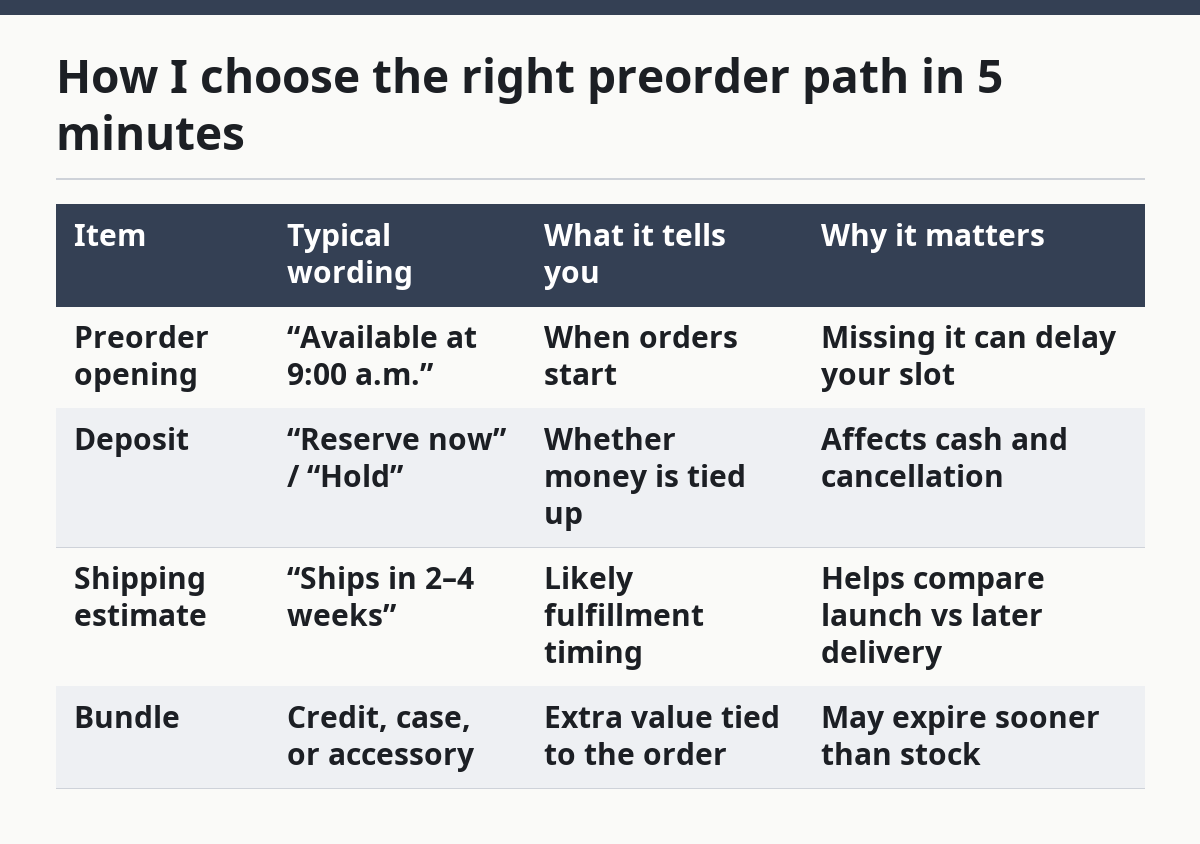
How I choose the right preorder path in 5 minutes
I choose the right preorder path by matching the seller, the deposit rule, the shipping estimate, the bundle, and the cancellation terms before the window closes. The quickest path is usually the one that reduces surprises after checkout.
Use this quick filter:
- Pick the seller first. Manufacturer store, carrier, and retailer pages may all behave differently. The result you want is the cleanest policy page and the clearest stock estimate.
- Check whether a deposit is required. If yes, decide whether you are comfortable with the charge or hold. A seller that charges only when it ships may fit a cautious buyer better.
- Look at the shipping estimate on the exact model. A 128GB version might ship earlier than a 512GB version. Choose the configuration that gives you the arrival timing you need.
- Inspect the bundle for real value. If the preorder includes a case, credit, or accessory, decide whether you would buy that item separately.
- Review cancellation and change rules. Some sellers let you cancel before shipment; others make changes harder once the order is placed. If flexibility matters, that rule can outweigh the bundle.
This is the part that many generic guides skip: preorder windows are not just a race to click first. They are a short decision period where the order details matter more than the hype. A person who knows the exact model and wants launch-day delivery can act fast. A person who is still comparing colors, carriers, or storage should slow down and avoid a bad order.
The trade-off is real. Speed helps you catch the first shipment wave. Care helps you avoid a purchase that ties up money, locks you into a carrier, or lands the wrong configuration. For most readers, the right balance is to prepare early, then wait until the preorder page shows the exact terms they want.
| Item | Typical wording | What it tells you | Why it matters |
|---|---|---|---|
| Preorder opening | “Available at 9:00 a.m.” | When orders start | Missing it can delay your slot |
| Deposit | “Reserve now” / “Hold” | Whether money is tied up | Affects cash and cancellation |
| Shipping estimate | “Ships in 2–4 weeks” | Likely fulfillment timing | Helps compare launch vs later delivery |
| Bundle | Credit, case, or accessory | Extra value tied to the order | May expire sooner than stock |
When a preorder window is the wrong move
A preorder window is the wrong move when you are unsure about the carrier, the storage size, or the deposit terms. It is also the wrong move if you need a phone immediately and cannot tolerate a later shipping estimate. In those cases, waiting for normal stock is often the better choice.
Three situations call for restraint:
- You need flexibility. If your budget may change next week, avoid deposits and holds.
- You want to compare models first. A preorder closes the decision too quickly.
- You dislike shipping uncertainty. Even a good estimate is still an estimate.
The reader who should not preorder is the one chasing a bundle just because it feels scarce. Scarcity is part of launch marketing. It is not a reason to lock in the wrong order. A later retail release or a restock may be a cleaner buy if the window is too narrow or the terms are too strict.
For the readers who do want to act, the rule is simple: follow the launch time, read the deposit language, compare the shipping estimate, and ignore the bundle unless it truly fits the purchase. That keeps the preorder window useful instead of stressful.
When do phone preorders open?
Phone preorders usually open at a specific launch time announced by the manufacturer, carrier, or retailer, often on the same day as the product announcement. The opening can be tied to a time zone such as 8:00 a.m. PT or 12:00 p.m. ET, so you should use the seller’s stated time rather than guessing from the announcement post.
Do all phones have preorders?
No, not all phones have preorders. Some models go on sale directly at release, while others are sold only after stock arrives in stores or online. The preorder window depends on the seller’s launch plan, the region, and the phone’s availability strategy.
What happens after a phone preorder?
After a phone preorder, you usually receive a confirmation email, an estimated ship date, and sometimes a charge or card authorization if a deposit applies. The seller then updates the order as stock is assigned, and the shipping estimate can stay the same or shift later if inventory changes.
Drafted with AI; not yet reviewed by a person.